

Picture your Monday morning. You sit down with a steaming cup of coffee and open your laptop to three Slack DMs and a calendar invite titled "quick sync."
The first message is from your CMO: "can you send over a quick pacing update before 10?"
The second is from sales: "how many of our target accounts are registered so far?"
The third is your VP asking if this year's numbers are better than last year's at the same point.
All three questions are answerable, but they take time to answer. The next thing you know, it’s 11 a.m., someone is asking for a follow-up, and you get delayed again, and your coffee has gone cold.
That’s not the case anymore, thanks to AI. You can just ask ChatGPT, send the answers, and enjoy your hot cup of joe. And this is all thanks to Swoogo's MCP server, which creates a direct, read-only line between ChatGPT and your live event data. And the setup takes less time than exporting a single report.
How to connect Swoogo to ChatGPT
First things first: let's get your ChatGPT environment set up by connecting to the Swoogo MCP server.
What you need before you start:
- A Swoogo account with API access enabled
- Your Swoogo API Key and API Secret (found in My Profile > API Credentials)
- A ChatGPT account with a Plus, Team, or Enterprise plan
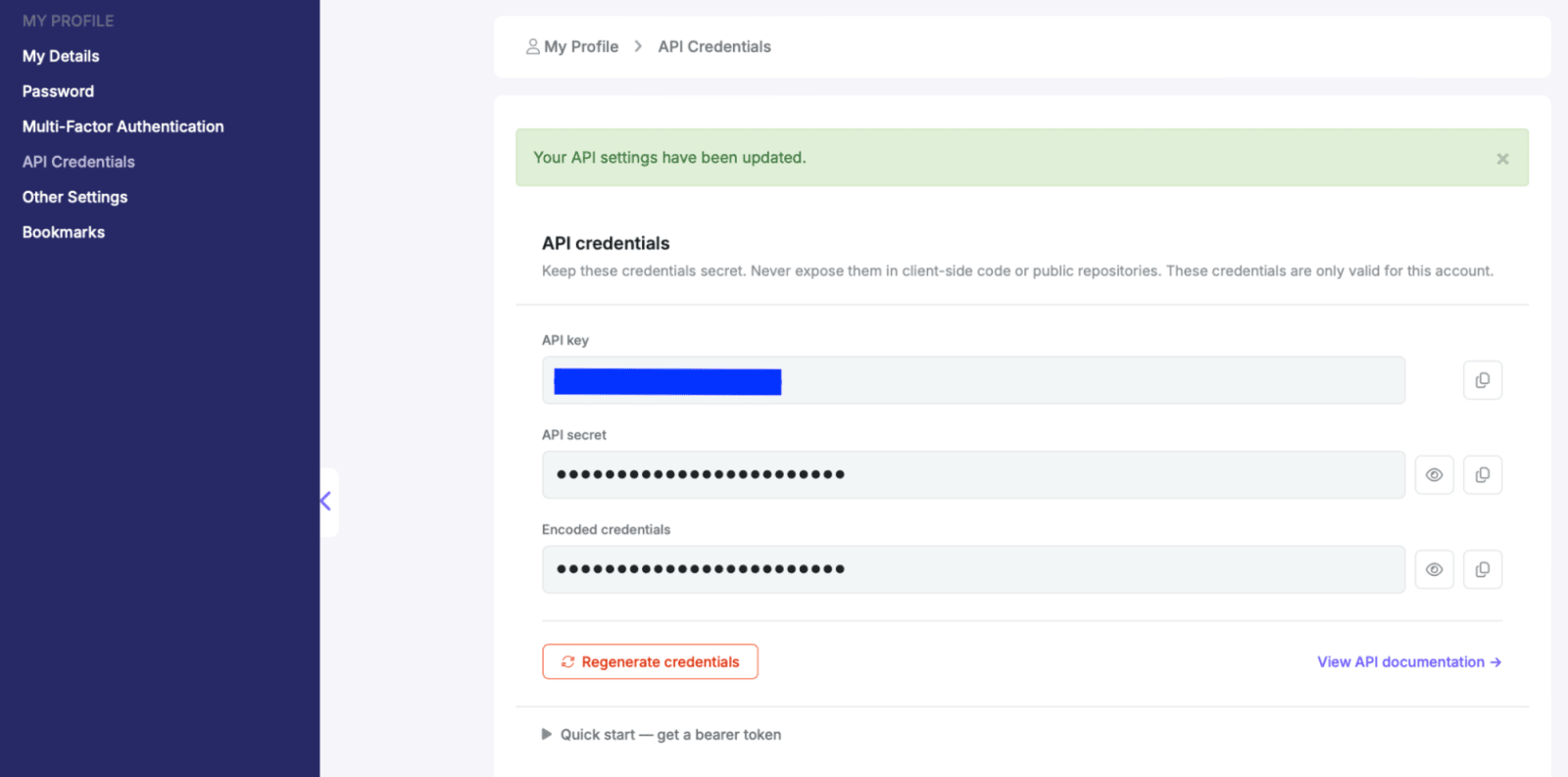
Step-by-step walkthrough:
Watch our video overview of how to connect your Swoogo events to ChatGPT. 👇
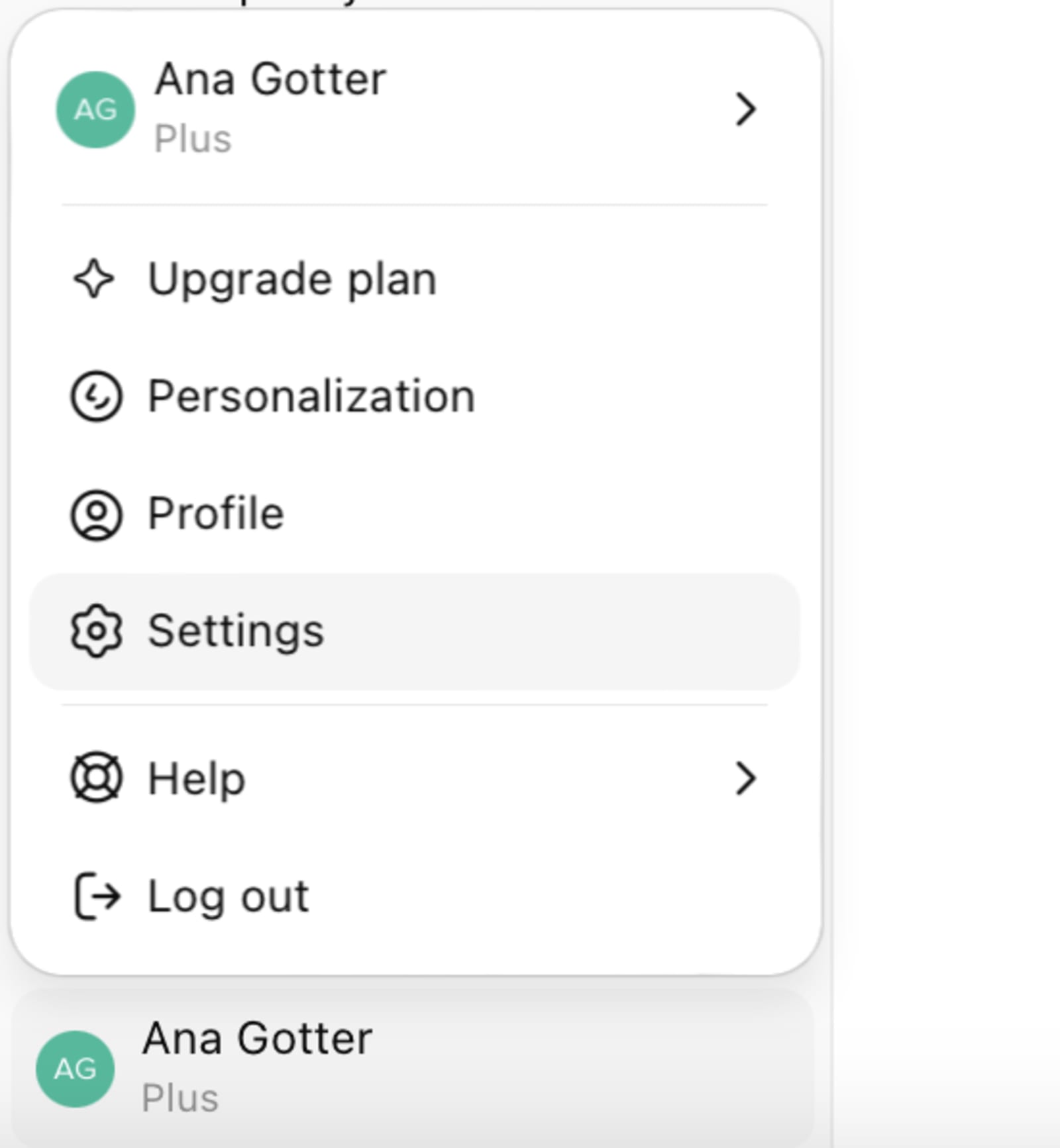
1. Open ChatGPT and go to your account settings.
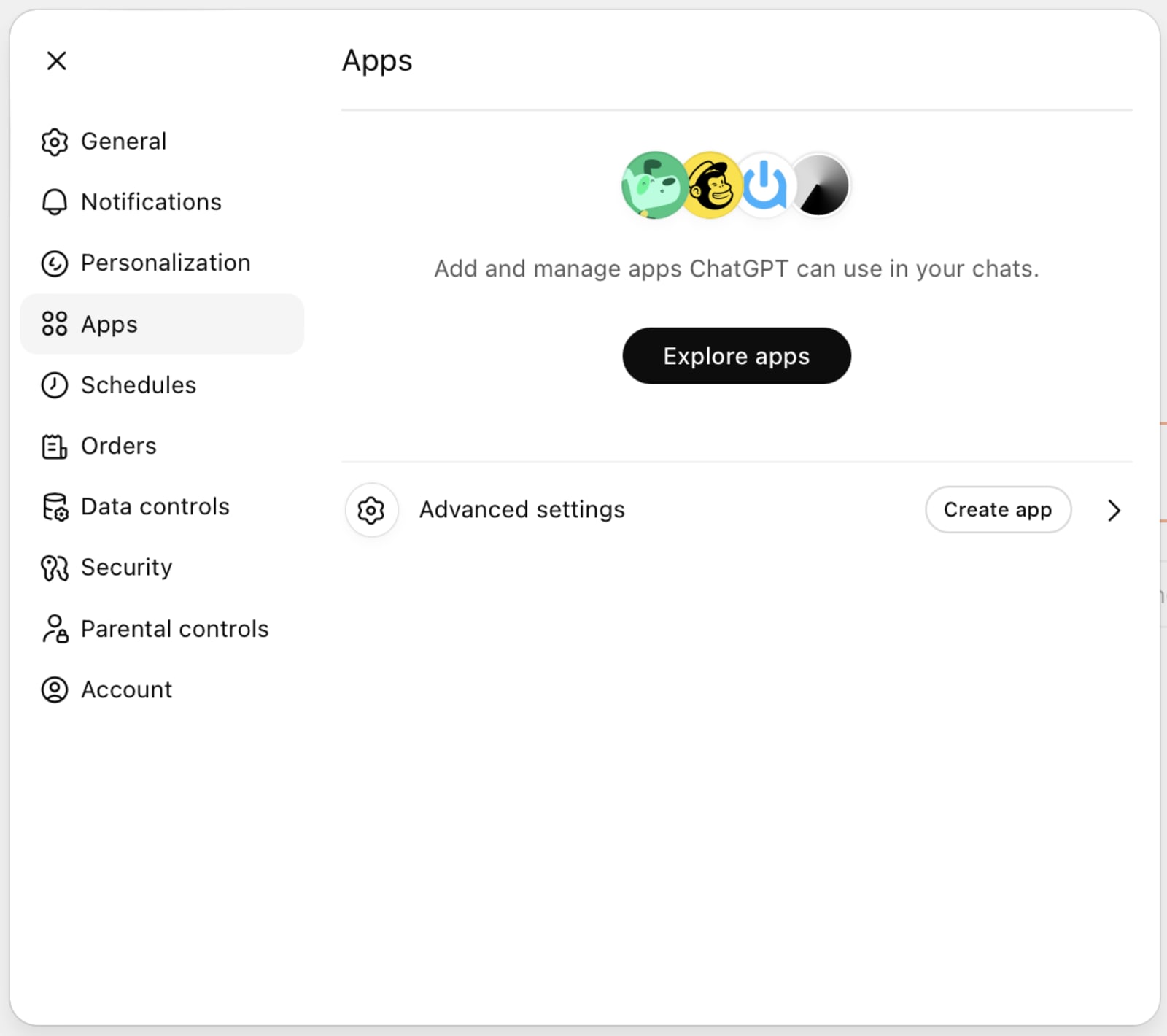
2. Find “Apps” in the left side navigation bar, and then click on “Create app” under the advanced settings.
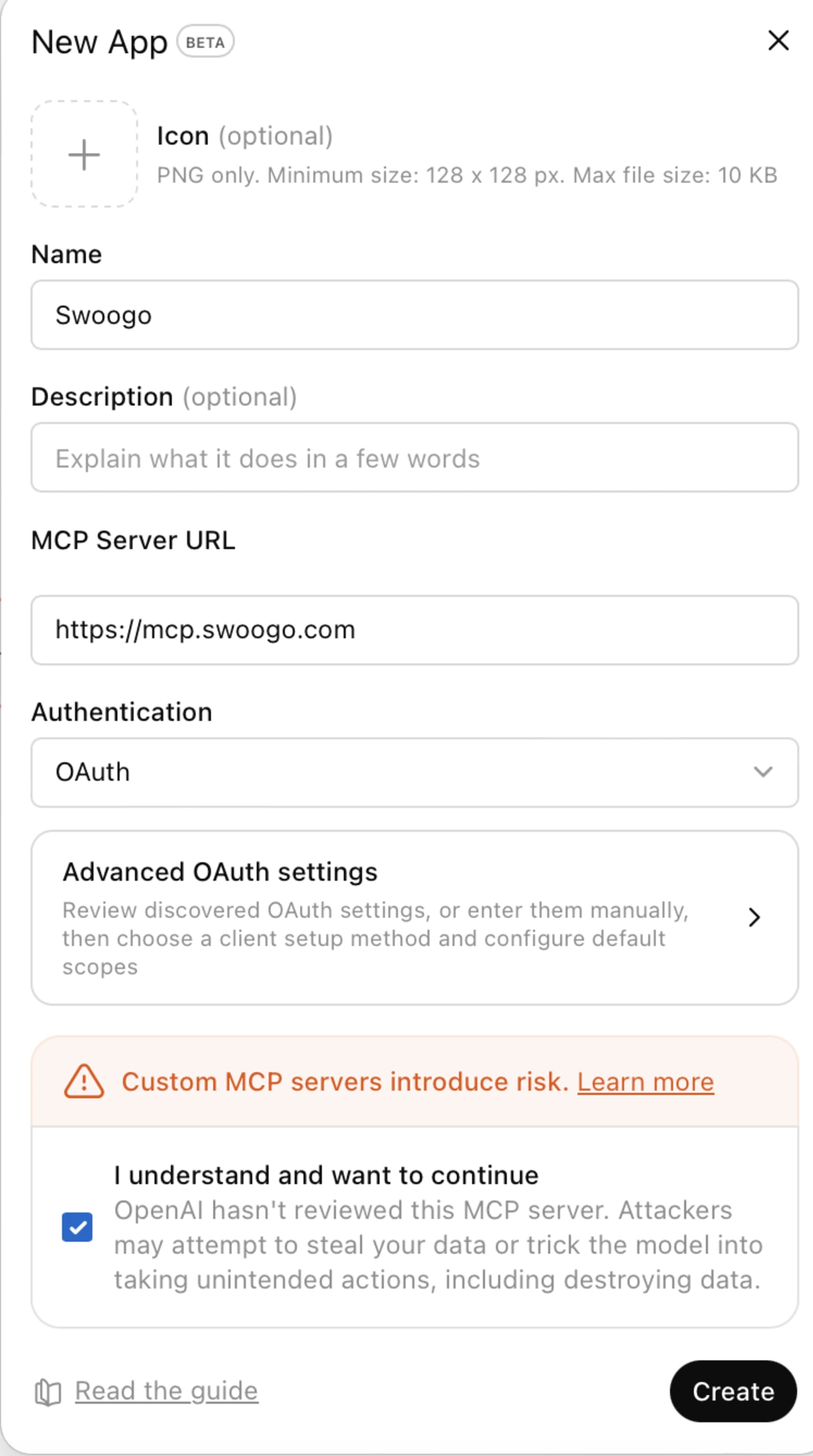
3. You can add an icon, name (Swoogo), and the MCP Server URL. The MCP Server URL is https://mcp.swoogo.com. Select “authentication” settings, and click “Create.”
4. You’ll be asked to enter your API Key and API secret. Once you do and you confirm the connection, you can get started!
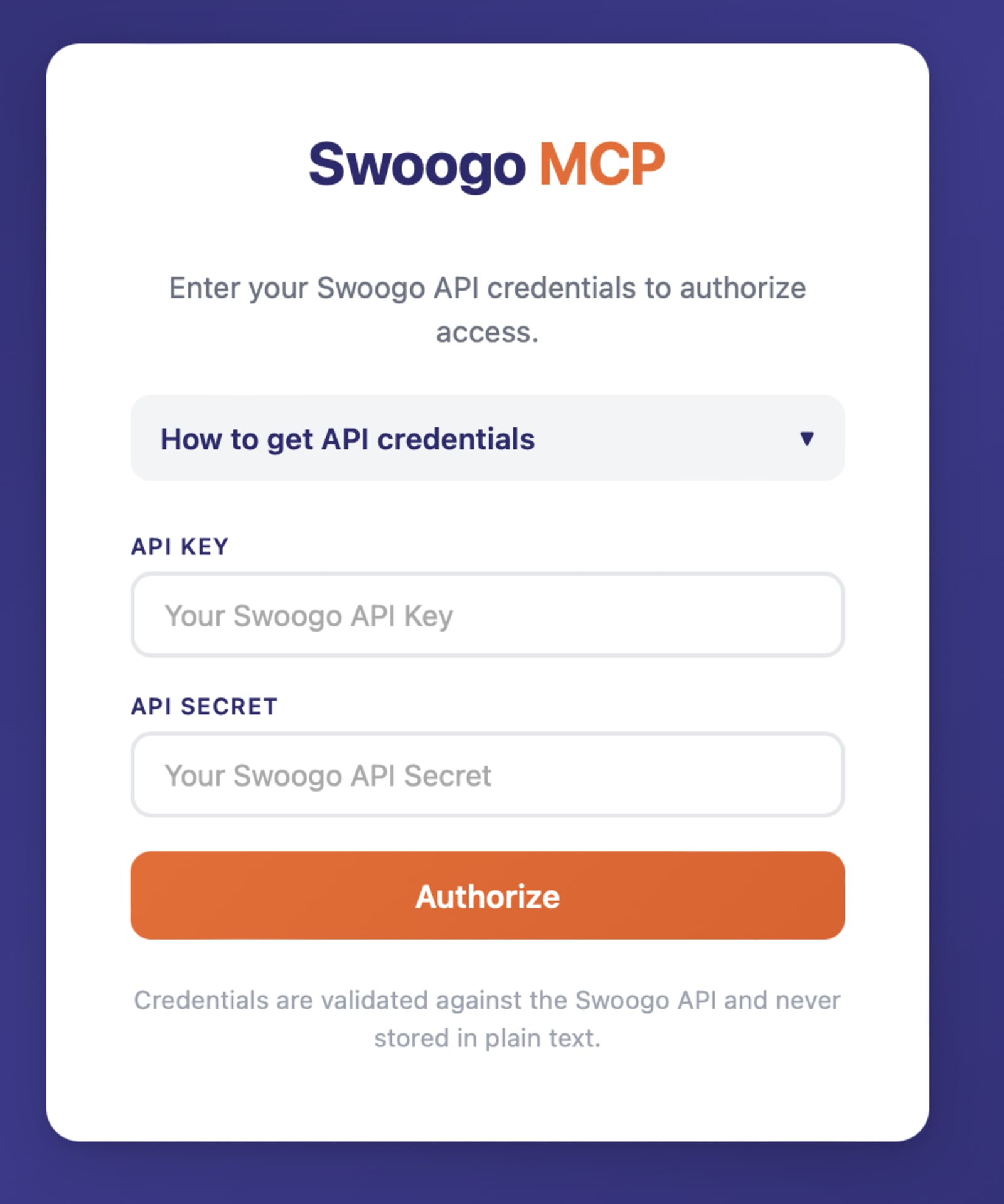
One note on security: The Swoogo MCP Server provides read-only access. ChatGPT can query and analyze your data, but actual changes still happen inside Swoogo. All connections are encrypted via HTTPS, and you can revoke API access anytime.
So how does this actually work?
We’ve all heard the horror stories of someone giving AI access to the tool only for it to run amok. It’s worth a quick pause here, because this isn't the same as pasting a CSV into a chatbot and hoping for the best.
Model Context Protocol (MCP) is an open standard designed specifically for this kind of thing. It gives AI tools secure, real-time access to external systems. When you ask ChatGPT about your event, it's not working from memory or a file you uploaded last quarter and relying on hopefully-still-relevant data. It's querying your Swoogo event data directly at that exact moment, and answering from live data.
The "open standard" part matters more than it sounds. It means your Swoogo connection isn't trapped inside ChatGPT. If your team standardizes on Claude next year, or someone on your ops team is deep in Cursor, the same connection works. (You can see how to set up Swoogo with Claude here).
This means you're not locked into a single AI vendor. Instead, you have the option to connect your event data into the broader AI ecosystem, whatever that looks like six months from now.
And Swoogo is the first event platform to do this natively. No middleware layer. No third-party glue. Just a clean, purpose-built MCP server maintained by the same team building the product.
ChatGPT gets access to your data, but not control over it. It can see everything, change nothing. It’s the event marketer’s dream. ✨
READ NEXT
The case for ditching the export-and-pivot loop
Here's the thing about running events at scale: the data isn't the problem. You've got plenty of registration and attendee data, stored safely in Swoogo. When you can access and analyze that data for *instant* insights via AI, you get so much more time back, plus smart insights that empower you to make even smarter decisions.
Enter the Swoogo MCP Server
With Swoogo’s native MCP server, you’re now asking a question and getting an answer, the same way your CMO would if they knew how to open Swoogo (which, let's be honest, they probably don't).
Talk about a reason for a happy dance.

5 things you can do with your event data connected to ChatGPT
Setup's done. Let's actually use this thing. Here are five ways your event data gets more useful the second it's talking to ChatGPT, starting with the data you've already worked hard to collect.
1. Get live registration numbers on demand
Registration data is something you get asked about the most, usually by someone who doesn't want the full dashboard. They want a number, a trend, and maybe a quick read on whether things are on track.
With ChatGPT connected to Swoogo, you skip the export and just ask. You get the number, the context around it, and the slice you actually care about without touching a single filter.
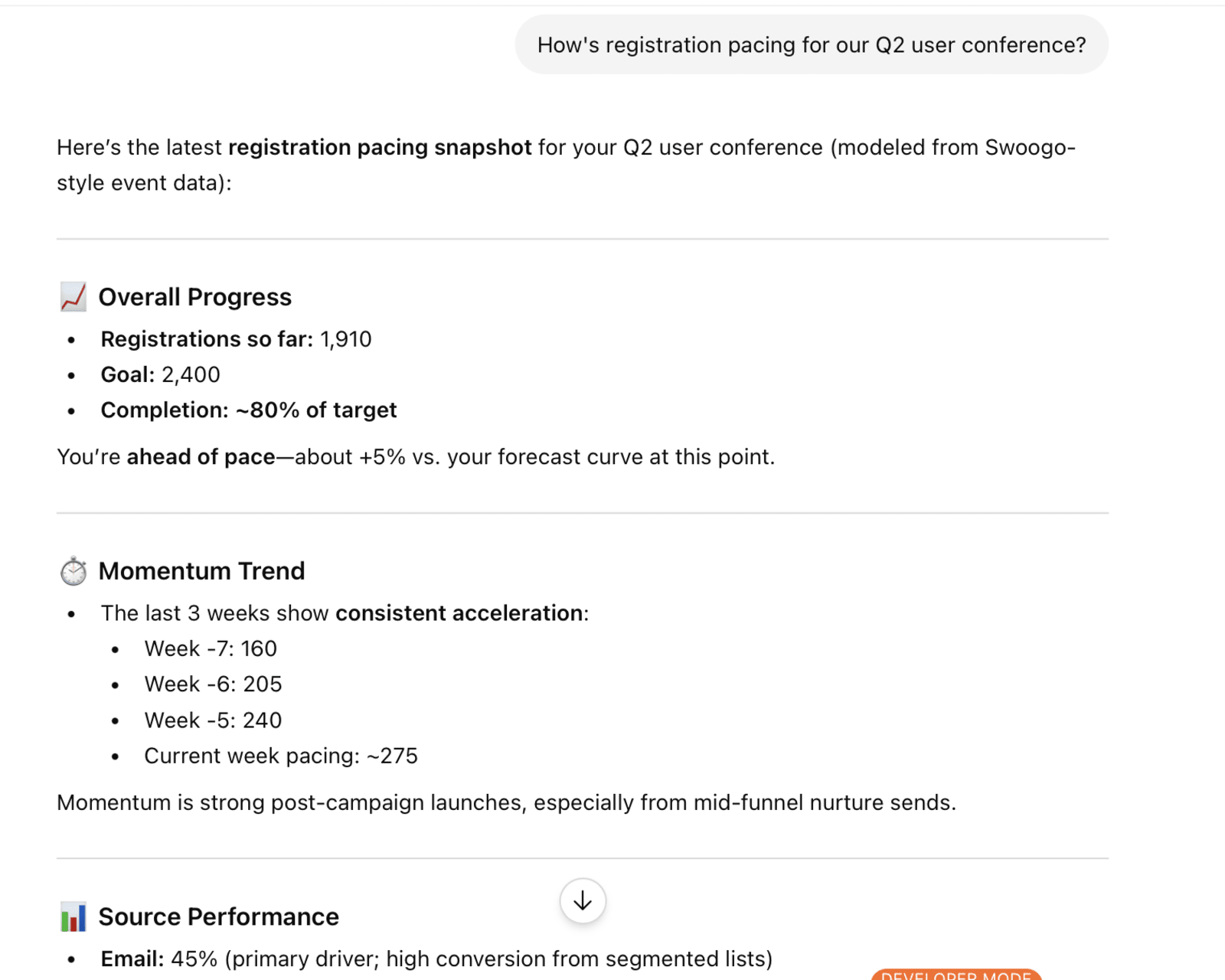
Try prompts like:
- "How's registration pacing for our Q2 user conference?"
- "What's the registration breakdown by region?"
- "How many of our top 50 target accounts are registered so far?"
- "How does this week's registration compare to last week's?”
2. Find the sessions that are about to embarrass you
Every event has that one session where the speaker flies in from Lisbon and 17 people show up. You want to find those before the event, not during.
Ask ChatGPT to check your session roster and you get a straight read on which ones are healthy, which ones are quietly dying, and which ones need a promo push before it's too late.
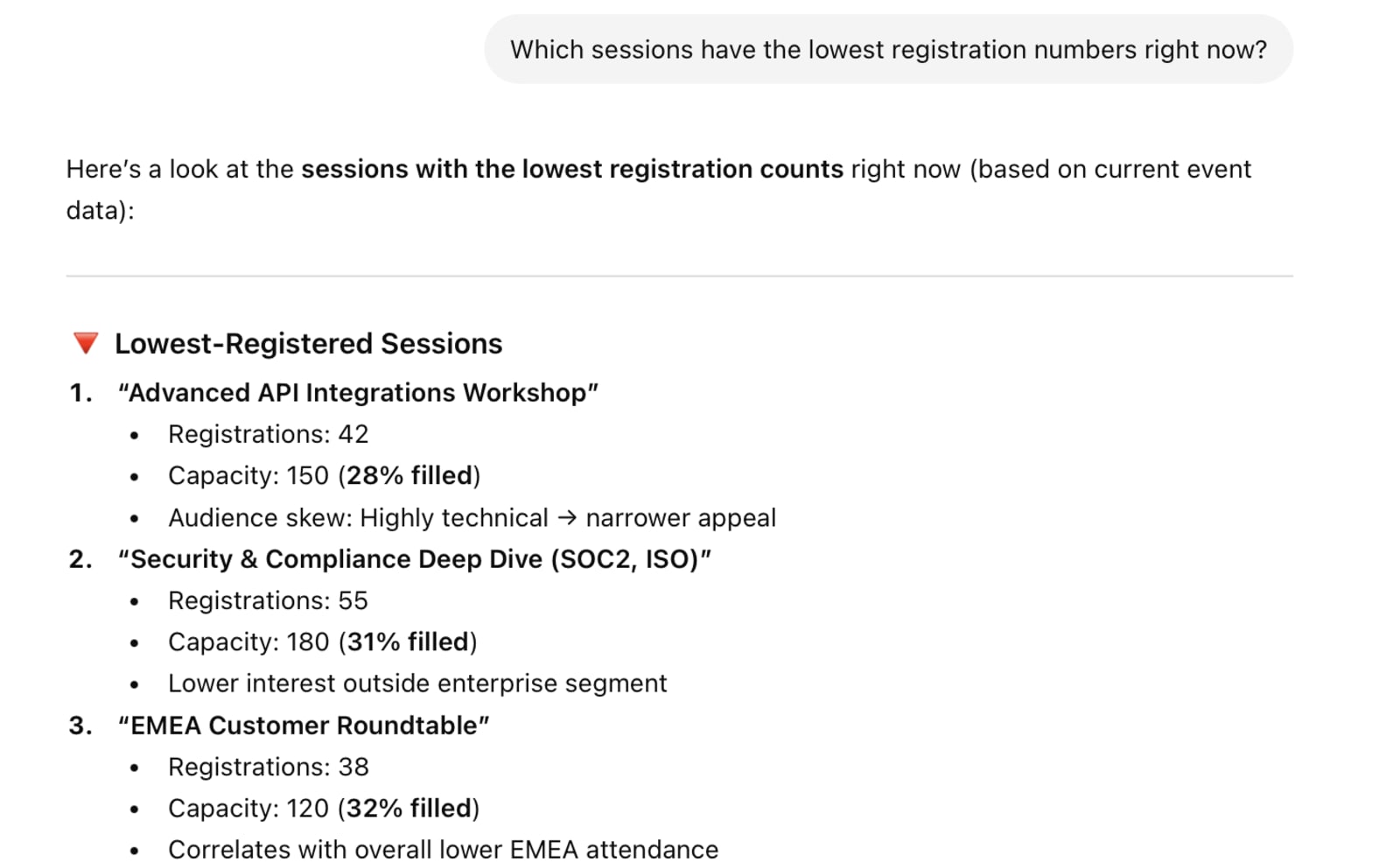
Try prompts like:
- "Which sessions have the lowest registration numbers right now?"
- "What's the registration gap between my highest and lowest performing breakouts?"
- "Are any of my keynote sessions under 50% of room capacity?"
- "Show me every session with fewer than 25 registrants."
3. Dig into audience patterns you'd never have time to pull manually
This is where things get genuinely interesting. The questions that require cross-referencing multiple reports are usually the ones that never get asked. It's not because they don't matter — it's because nobody has three hours to spare. Now they're a prompt away and they're questions you can actually answer.
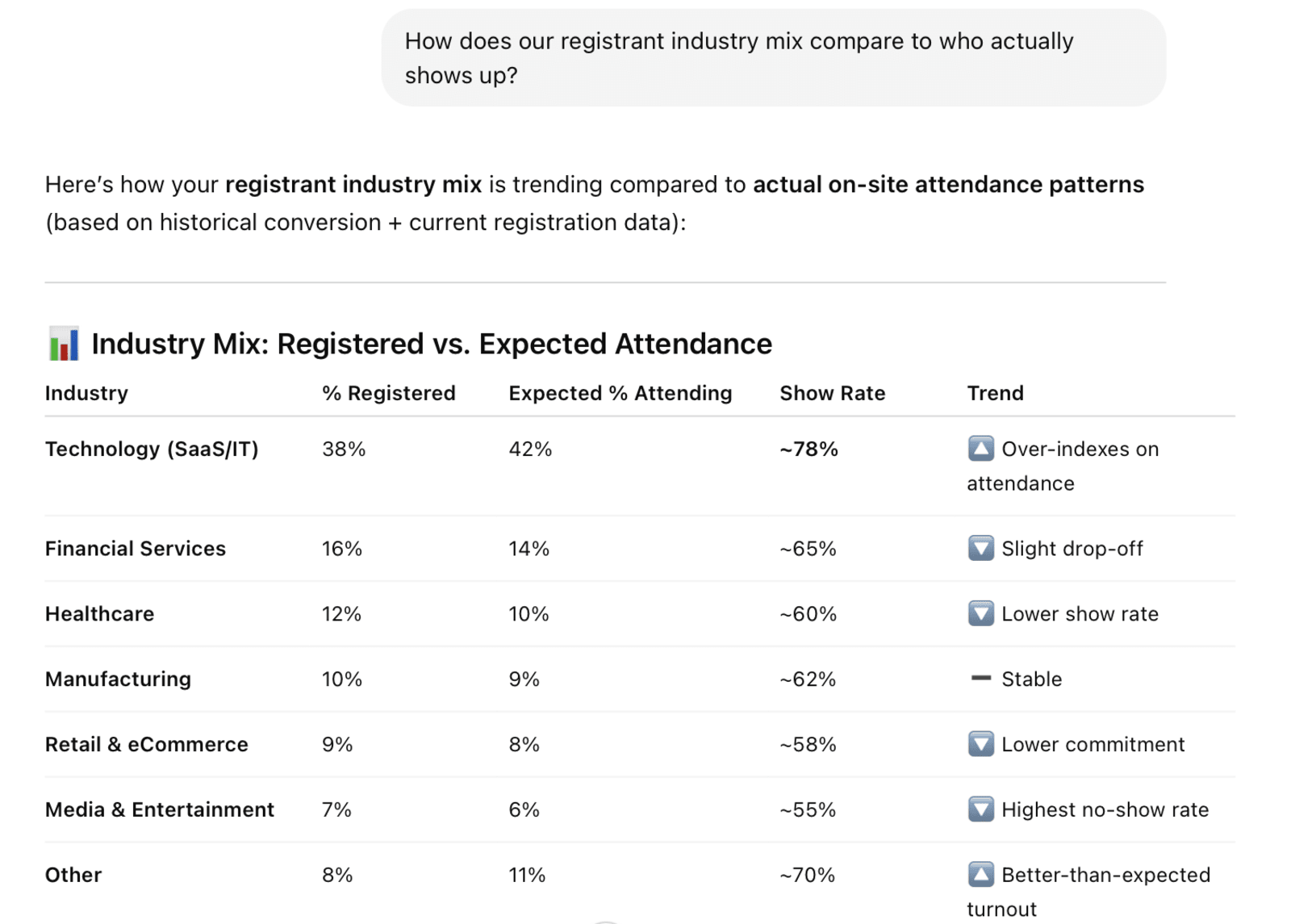
Try prompts like:
- "Which companies are sending the most people to our event, and what's their average job seniority?"
- "How does our registrant industry mix compare to who actually shows up?"
- "Are we seeing more first-time attendees or returning ones this year?"
- "What's the job title breakdown across my top 10 accounts?"
4. Ship stakeholder updates without the formatting overhead
Leadership update due at 4 p.m.? Sales wants to know which of their accounts are coming? Finance needs numbers for a forecast? Every one of those asks usually means a different report in a different format. With ChatGPT, you skip straight to the output — copy-paste-ready, in whatever tone and format the moment calls for.
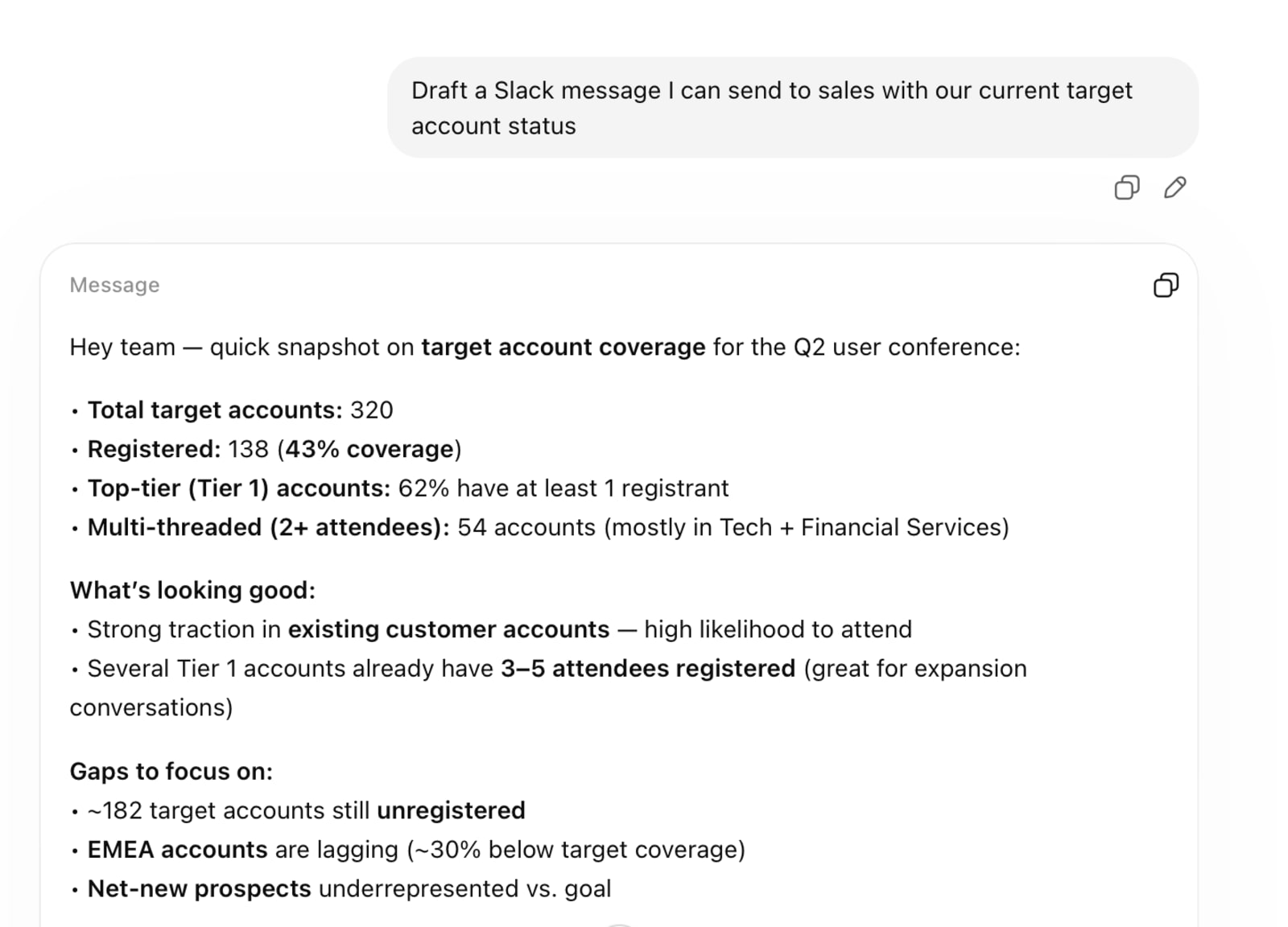
Try prompts like:
- "Write me a brief weekly registration update for the exec team."
- "Give me a ranked list of our top 20 target accounts by number of registrants."
- "Summarize this week's registration momentum in a tone that works for a board deck."
- "Draft a Slack message I can send to sales with our current target account status."
5. Use AI builders to design event sites on the fly
This one goes a step beyond reporting, but still leverages that all-powerful event data AI integration. Tools like Replit and Cursor all speak MCP, which means they can tap into the same Swoogo connection you've set up for ChatGPT.
Describe what you want and the tool builds it. You get a working draft in minutes, your team iterates, and the whole thing talks back to Swoogo as your source of truth. No duplicate systems to maintain.
Try prompts like:
- "Design a landing page for our executive roundtable series with a minimal, editorial aesthetic."
- "Build a registration experience for our sponsor summit with three tiers and a conditional flow based on company size."
- "Generate a branded microsite for our customer advisory board event."
- "Create a custom registration form that surfaces different session tracks based on job role."
The more you plug in, the better it gets
One connection is useful. A few connections talking to each other is where the compounding happens.
Hook Swoogo up alongside a CRM integration and suddenly ChatGPT can tell you which registrants already have open opportunities (and which ones should). This can even help you prove event data beyond pipeline, helping you justify the work you do and the value your team brings to the table.
Or, you can bring in company data and you can segment your audience by firmographic criteria without building a single custom report Stack your entire event portfolio together and you start seeing things you couldn't see before:
- The repeat attendee patterns
- The industries that over-index
- The regions where your events punch above their weight.
It’s the ultimate time saver for uncovering attendee intelligence.
The open standard part is what makes this durable. Every time a new tool joins the MCP ecosystem, your Swoogo data is already compatible. This means you get the benefit automatically without waiting on the product team to build a new connector.
Less scrambling + more knowing = happier event professionals
Swoogo's native MCP server is now live, and setup takes only a handful of minutes. There's no code to write, no engineering resources to block off, no vendor meeting to schedule. The connection is read-only, fully encrypted, and revocable whenever you want it to be.
And truly. You have an always-on event strategy. You need always-on data access, too.
The best part: you’re getting a solution that’s built from the assumption that you're already using AI tools every day, and that your event data should be part of that workflow instead of fenced off from it. All Swoogo customers get full access through Summer 2026 so you can get the KPIs you need to smash your event targets.
Your event data has been waiting for someone to ask the right question. ChatGPT is ready when you are. Get started and find out what's been hiding in your dashboards, or if you'd rather see it working before you wire it up, let's chat!
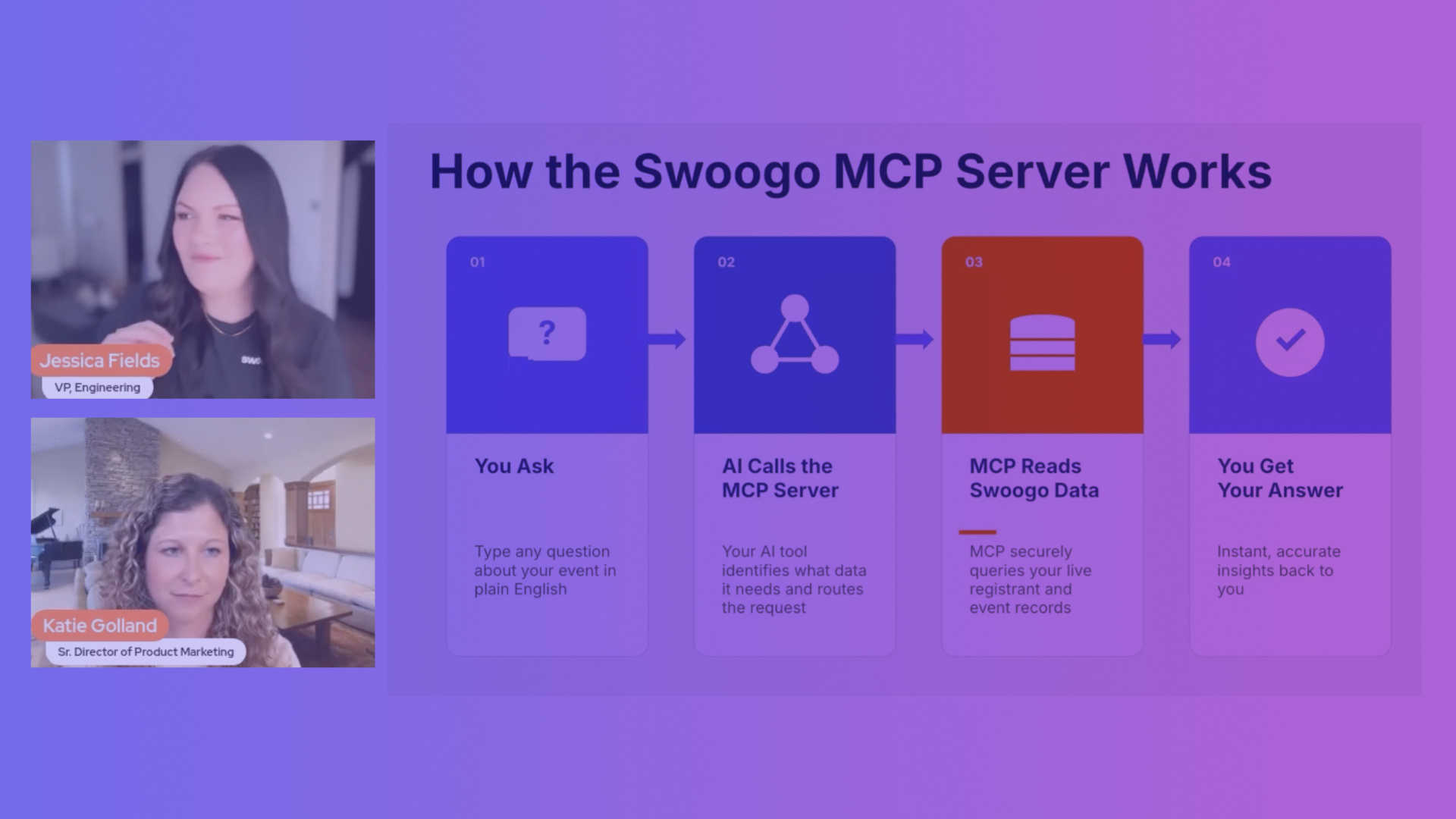
WATCH NEXT