


AI is everywhere. Every tool has it. Every vendor is “powered by it.” Every LinkedIn post is yelling about it.
Yet, most event teams are either ignoring it or using it for stuff that doesn’t actually move the needle.
The real question is no longer, “Should we use AI?”
It’s, “where does AI actually save time for event marketing and management—and where does it just create more work?”
That’s exactly what we’re about to get into. 👇
Where AI actually saves event teams time
The easiest way to understand where AI helps (and where it doesn’t) is to look at your event lifecycle: before, during, and after.
AI shows up differently in each phase, and if you only use it in one, you’re leaving a ton of value on the table.
Before the event: Content and personalization at scale
This is where most teams start with AI, and for good reason! It works… if you use it correctly.
The obvious win: Content generation (the right way)
Let’s address the elephant in the room: yes, AI can write.
But should it write your entire event strategy or your core messaging from scratch for you? Absolutely not. 🙅
That’s how you end up with bland, one-size-fits-all copy that sounds like every other event on the planet.
Where AI does help is speeding up the repetitive parts that you already have the foundational raw material for. Think speaker bios, session descriptions, email variations, and social snippets.
For example:
- Instead of writing 50 speaker bios manually, you feed AI a LinkedIn profile or intake form and get a solid first draft in seconds. To make this even better, also provide example speaker bios to give AI context on what “great” looks like.
- Instead of staring at your screen trying to come up with subject lines, you get five options instantly.
- Instead of rewriting the same agenda for five channels, you repurpose it in minutes.
That’s real time saved.
But here’s the deal: AI is your drafting partner, not your final author.
You still need to:
- Inject your brand voice
- Fact-check (because AI will invent things, like speaker credentials)
- Review and edit it for quality and flow
- Ensure the content is in line with your event brief
- And yes, occasionally delete those sentences that sound like they were written by a robot who just discovered adjectives (robust, scalable, innovative…)
If you skip those steps, your audience will feel it. Immediately.
The less obvious win: Personalized registration flows
This is where using AI for event marketing work starts to move beyond “nice to have” and into “this actually changes the experience.”
Most event registration flows are fine. Functional. They get the job done. But they’re also generic.
AI helps you make registration feel more relevant without manually segmenting everything yourself. Based on attendee data—job role, industry, past behavior—you can start surfacing:
- Sessions attendees are more likely to care about based on their demographics
- Tracks that align with their goals
- People or sponsors they might want to meet
When attendees feel like the event is tailored to them, they’re more likely to actually register, show up, and engage once they’re there. Leverage AI and eliminate the manual process of that personalization.
During the event: Let AI handle the repetitive tasks
Great event tech lets your team be present—talking to attendees, solving real problems, and creating moments that feel a bit ✨magical. ✨
That’s where AI comes in. It takes care of the low-value, repetitive work, so your best humans can properly human.
Real-time support and faster insights
It’s morning on event day, and you want to keep your sales and customer support teams updated on how attendance is tracking and where attention is needed. But jumping between tabs and investigating individual accounts, all the while engaging with your attendees, is a tall order that takes time.
If your event data is connected to your AI tools, this can take seconds. With Swoogo’s MCP server, since it integrates directly with your live data, your staff can quickly check the status of your event and ask questions to get faster, smarter insights, without needing to scroll through records, ping someone in Slack, or chase down the ops team.
Imagine if you could just query into Claude or ChatGPT, “It's 10 a.m. on day one of our event. Give me a real-time attendance snapshot: how many registered attendees have checked in so far, which sessions are filling up fastest, and are there any no-shows from VIP or key accounts I should flag for my team right now?"
Boom.
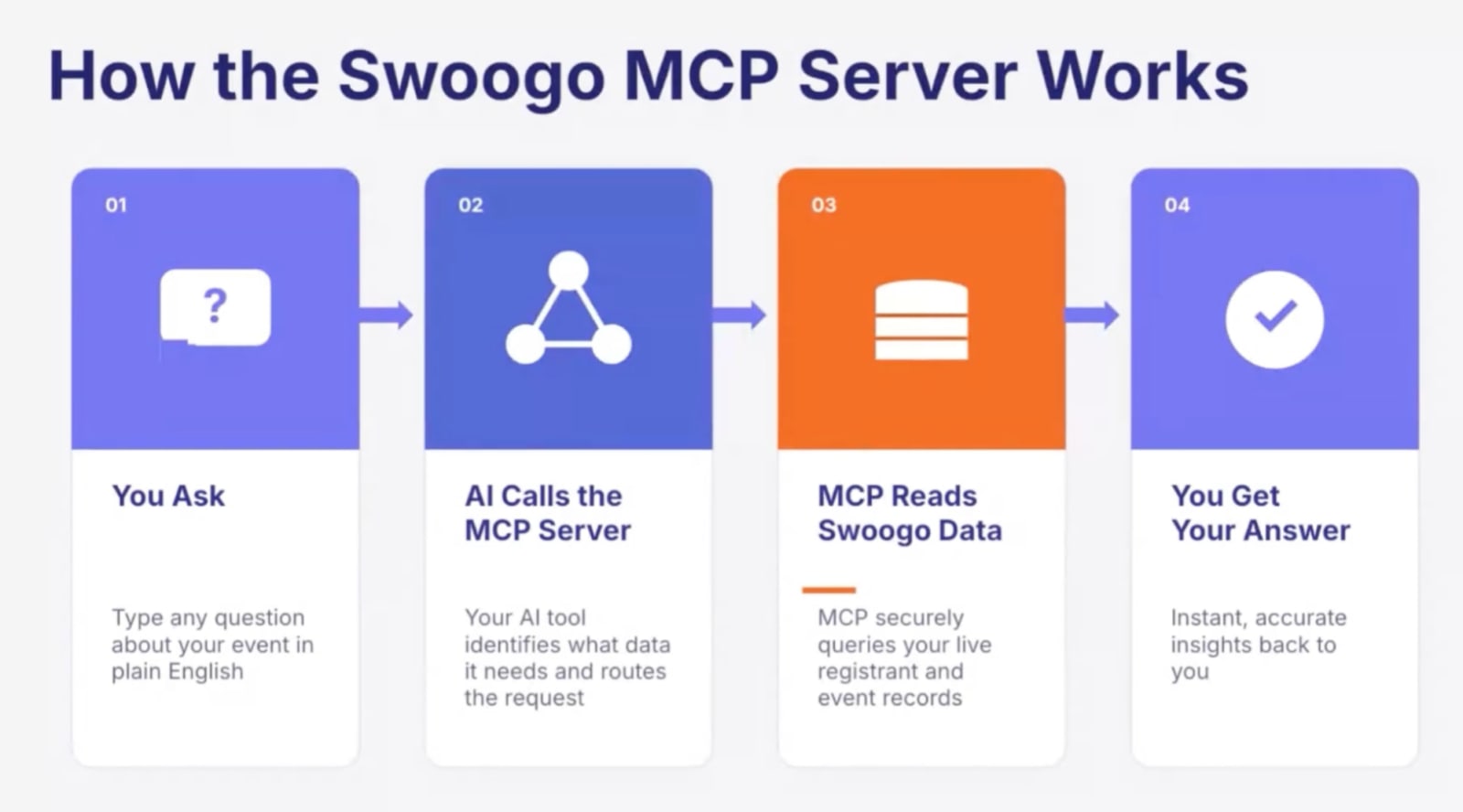
Want to go further with Swoogo and AI for all of your event marketing needs:
- See what Swoogo’s MCP server actually looks like in practice
- Connect your event data to Claude
- Connect your event data to ChatGPT
Pro tip: Kick off each event day by asking your AI tool for a quick 30-second briefing—attendance numbers, check-ins, VIP arrivals. It’s a simple way to stay on top of what’s happening without digging through dashboards first thing.
Live transcription and session summaries
There’s always scheduling overlap at events. It’s unavoidable.
Attendees have to make trade-offs because your team did a great job planning the agenda (go you!), which usually means missing something valuable.
This is another one of those moments where AI actually earns its keep.
With real-time transcription and automated summaries, attendees don’t have to feel like they’re missing out completely. They can catch up on key moments later without watching an entire recording.
For your team, this also removes a massive post-event task. Instead of manually reviewing and repurposing sessions, you already have structured content to work with.
It’s one of those rare cases where something improves both the attendee experience and your internal workflow. 👏
Social sentiment monitoring
This is one of the more underrated uses of AI for event planners, but it’s super practical.
Events generate a constant stream of feedback on social media, in apps, and in chats. The problem is, it’s not realistic for a human team to monitor all of it in real time.
AI can scan that noise and surface what matters:
- Complaints that need immediate attention
- Confusion around schedules or event logistics
- Moments people are genuinely excited about
That gives you a chance to act during the event, not after it’s over.
Whether you need to fix an issue before it escalates or amplify a moment before it’s over, you can do it in real time. See what we mean about AI helping your team human better? 🤖🤝👫
After the event: The biggest opportunity most teams miss
This is where AI really delivers on its ROI for event marketers.
Ironically, it’s where the majority of event teams leave the most time on the table. The reason can be pretty simple: by the end of an event, you’re just exhausted. With a capital E.

Yep, back to content we go! You just ran a full event, and now you’re sitting on a ton of it.
However, it’s hidden inside hours upon hours of recorded sessions and transcripts from keynotes, panels, sessions, and Q&As.
Turning that into usable content manually is time-consuming, to say the least. You’ll remember a cool moment or two you want to share, but not everything, and combing through all that data to find the rest is a lot of work.
That’s where AI comes in, sifting through everything to surface the good stuff for your event marketing team:
- Short highlight clips
- Blog topics
- Social post ideas
- Follow-up email content
Instead of starting from zero, you’re working from something that already exists. Plus, you get to smartly extend the life (and value) of your event long after it ends.
Survey analysis at scale
Harsh truth: most teams don’t fully use their survey data. Not because it’s not valuable, but because it’s overwhelming.
Reading hundreds of open-text responses to your event survey questions, spotting patterns, and turning that into something actionable takes time most event teams don’t have.
AI steps in as a filter to:
- Group feedback into themes
- Flag NPS patterns
- Highlight trends across different attendee segments
- Surface the comments that actually tell a story
So instead of vague takeaways like, “people seemed happy,” 👎 you get: “NPS was highest among attendees who followed a recommended track, with feedback highlighting how smooth and well-paced the experience felt.” 👍
And these are the insights you actually need, whether you’re planning your next event, justifying budget, or proving ROI to sponsors.
Truly personalized follow-ups
Most emails are generic because personalization at scale feels impossible. AI essentially makes it manageable, so you don’t just send "thanks for coming" but "here's the content from the session you attended, plus two related resources."
It doesn’t have to be overly complex, just useful and relevant. These small touches are what turn your event from a one-and-done into something attendees come back to year after year.
Where AI creates more work (honest takes)
Let’s say it loud and proud: AI isn’t always the answer. 📣
And knowing where it doesn’t work is just as important as knowing where it does.
When prompting takes longer than just writing
There’s a point where using AI becomes overkill.
If you’re writing something short, simple, and one-off, spending time crafting prompts and reviewing outputs can actually slow you down.
AI shines when there’s volume and repetition. Without that, it’s like getting up to grab a calculator to add 2 + 2. You just don’t need it.
Generic output that needs heavy editing
AI doesn’t know your brand voice, your audience’s inside jokes, or your speakers’ personalities. It’s never attended your events, felt the vibes, or made the connections. You, on the other hand, have. ♥️
If you’re writing something that truly has your audience at heart, then it’s best to skip the AI, because you’ll end up rewriting most of it anyway.
To polish it up at the end? Sure. But to capture the onsite event magic? Not so much.
Over-relying on AI for human moments
The point above carries over to this one as well. Events are fundamentally about connection.
Networking recommendations, 1:1 meeting matching, and attendee outreach still need a human touch to feel genuine. AI can support, but it shouldn't replace. Because when something meant to feel personal starts to feel generic, it does more harm than good.
Data quality issues
This is a big one! AI doesn’t fix bad data. It builds on it.
If your CRM is messy, your personalization will be off. If your data is incomplete, your insights will be shallow. If your inputs are wrong, your conclusions will be too.
Unfortunately, AI can 100% produce confident-sounding insights based on flawed data. 😬
So make sure your event data is clean, properly integrated, and up to date, or you’ll end up with conclusions that sound smart but are dead wrong. And that’s honestly more dangerous than no insights at all.
How to choose the right AI tools for your event stack
No, you don’t need 15 AI tools. You just need the right ones.
Here’s how to sanity-check them:
- Does it integrate with your existing stack? AI tools that don't connect to your CRM, event registration platform, or email tool create more silos, not fewer.
- Is it built for event use cases, or adapted from something else? Generic AI tools can help with content, but purpose-built event AI that’s embedded in your platform is more likely to understand the workflows that matter.
- Can your team actually use it without a developer? If the tool requires developers, a complex setup, or endless training, you can bet your buttons that adoption will stall. The best options for event pros are those that don’t require IT.
- Does it have guardrails for brand and compliance? This is especially important for enterprise teams. You need an AI with content review control, brand consistency, and compliance checks, because “AI wrote it” is not going to fly with legal.
Make AI actually useful with Swoogo
Remember: using AI isn’t the goal. Saving time is.
The event teams getting the most out of AI aren’t using it for everything. They’re using it where it actually makes a difference, like cutting down manual work, getting to insights faster, and improving follow-up.
That’s exactly where Swoogo fits in!
Instead of exporting data, building reports, or stitching tools together, you can bring your live event data into the AI tools you’re already using. Ask questions, spot issues, generate content, and move faster—without adding more to your plate.
So instead of more tools, more tabs, and more work, you finally get less. Chat with us and we’ll show you exactly how Swoogo makes AI useful, not just busy.
FAQs: AI Event Marketing
What is AI event marketing?
AI event marketing refers to the use of artificial intelligence tools to automate, personalize, and optimize event marketing tasks—from content creation and email campaigns to registration personalization and post-event analysis.
Which event planning tasks benefit most from AI?
High-volume, repetitive tasks see the biggest gains: writing content variations, analyzing survey data, generating follow-up emails, and personalizing registration flows. Tasks that require human judgment, relationship-building, or brand voice still need people.
Can AI help with hybrid events specifically?
Yes, particularly for live transcription and session summarization, which help virtual attendees stay engaged, and for real-time social monitoring during live portions of the event.
How much time can AI actually save event teams?
It varies, but teams report saving hours per event on content production alone. Post-event survey analysis that used to take days can be reduced to under an hour with the right AI summarization tools.
Will AI replace event planners?
No—and this is worth saying plainly. AI handles the busy work. The in-person experience, the relationships, the creative direction, the real-time problem solving—that’s human work, and it’s the part that actually makes events worth attending.