


Exclusive events are everywhere right now, and the best marketing and event teams are leaning into them hard. Walk through Cannes Lions, Dreamforce, or SXSW, and alongside the main programming you'll see brands running intimate activations, invite-only dinners, and curated experiences that are harder to get into than the conference itself. Take it from Julius Solaris and Swoogo’s Hilary Laney, who reported live from Cannes. 🤯
The exclusivity is what makes these events and activations feel special.
If you're not running exclusive events yet, you're leaving pipeline (and brand equity) on the table. Here's how to pull it off without burying your team in manual work.
Why exclusive events are your big opportunity
Events today serve as pipeline accelerators, retention plays, and brand moments. With these higher stakes, the way event success gets measured has shifted.
Fewer teams are celebrating badge scans and headcount. More are asking, how many meetings came out of it? Which deals moved? What pipeline got influenced?
When you measure events that way, the math changes. A room of 25 right-fit prospects outperforms a room of 100 random ones. The conversations are warmer, the follow-up is more targeted, and the deals that come out of it are more likely to close.
The dynamic shifts too. Executives talk differently when they're surrounded by peers, not mixed in with mid-level attendees who aren't in a position to make decisions. Your sales reps walk out with real confidence in every conversation they had, because they know every person in that room was pre-vetted.
Plus, the halo effect on your brand is real. Exclusive events signal that your company operates at a certain level. Being invited carries weight.
3 tools to run exclusive, gated, and private events
Okay, so we’re ready to prioritize the guest list. Swoogo gives you three ways to control who attends your events, each built for a different kind of control need. Here's a quick look at which one fits your situation, then we'll go deeper on each.
1. Invite-only events
⭐ Best for: controlling who can registerInvite-only is the velvet rope of event registration. You build your invitation lists directly in Swoogo, send invitation emails, and (here's the key part) set your event to invite-only mode. That means the registrant's email address has to be on one of your invitation lists in order for them to successfully complete registration.
If someone random stumbles onto your registration page, or a well-meaning colleague forwards the link to someone who wasn't supposed to get it, they simply can't register. The list is the gate.
This works best when you already know exactly who you want at your event. You're enforcing a list you've already built: customers only, members only, or named accounts only. Whatever your criteria, you decide ahead of time, build the list, and Swoogo does the enforcing.
One thing to keep in mind: Invite-only is great for controlling access, but it doesn't help you evaluate applicants. If you don't know in advance who should be there, or want to cast a wider net and then filter, Apply to Attend is the better fit.
2. Apply to Attend
⭐ Best for: vetting and handpicking attendeesApply to Attend is the most flexible option in Swoogo's registration toolkit. You can set up an application step for all guests to complete before they officially register, or you can send your VIPs directly through to registration.
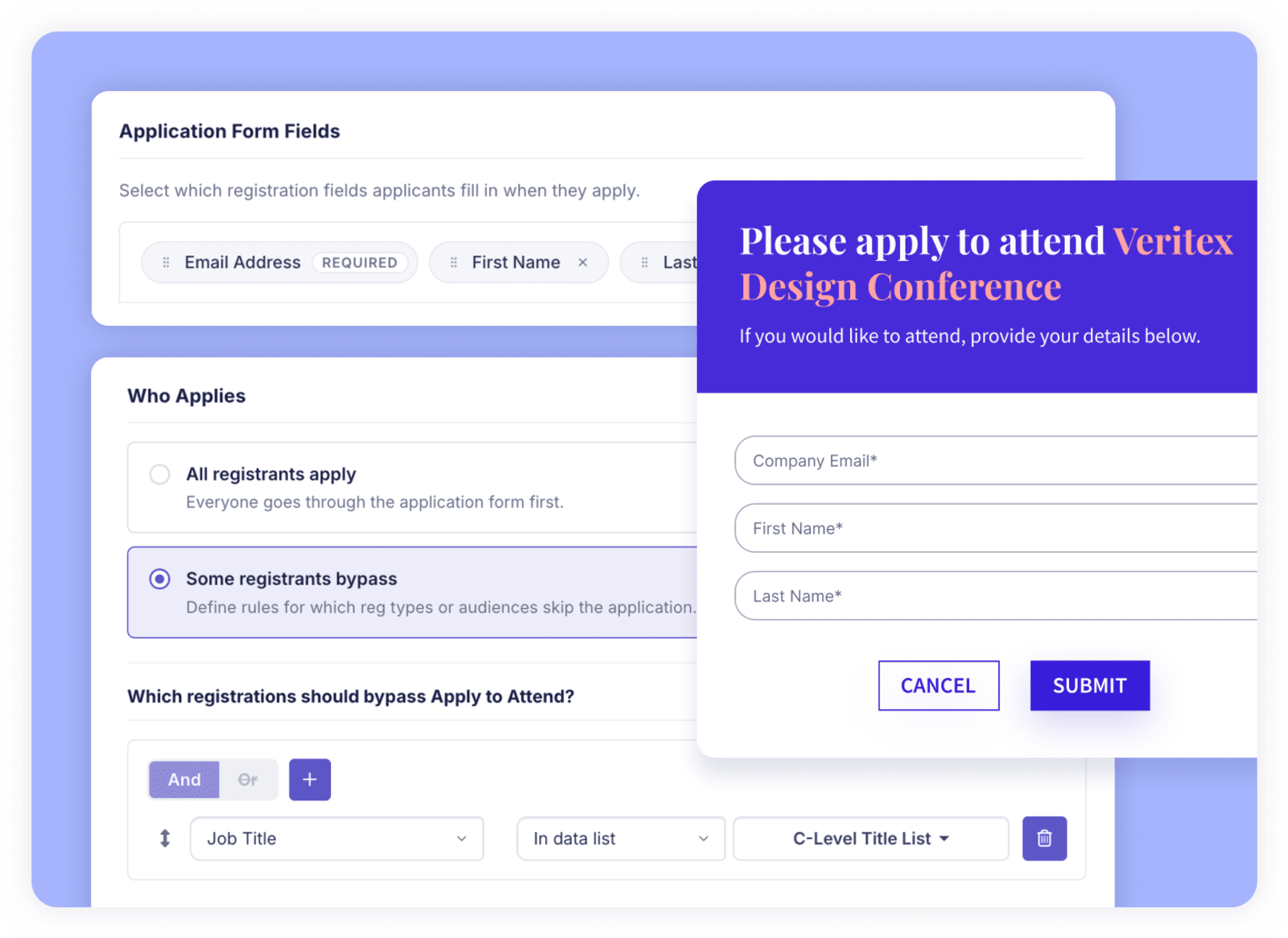
When Apply to Attend is enabled, visitors who try to register are redirected to an application form instead. They fill out the application (with whatever fields you deem), and then your team can decide who makes it through to register. Meanwhile, you can allow certain people to bypass the application step entirely (based on their title, company, or a list that you preselect), saving your team a ton of time.
Everybody else must get vetted by your team first in order to register.
A few things that make it especially powerful:
- You set the screening criteria. Any registration field can be an application field. Screen for seniority, company, ICP fit, membership tier, partner status…whatever your event requires.
- Fast-track the people you already know. VIPs, speakers, sponsors, and event staff shouldn't have to go through a review process. Set fast-track rules to automatically approve certain guests so they skip the queue entirely and go straight to registration. Multiple pathways make everything more efficient.
- Your whole team can review, in one place. Your event team can review and take action in the report simultaneously, so every decision is logged, timestamped, and attributed. No more finagling with those shared spreadsheets.
- Automated emails keep everyone in the loop. You don’t have to lift a finger. Applicants get a confirmation when they submit and a registration link when they're approved. Your team gets an alert for every new submission.
- Statuses sync to your martech stack. Applicant statuses sync straight to contact records in Salesforce, HubSpot, and more. Your CRM always stays updated, while your martech tools also fire off lead scoring, campaigns, and more accordingly.
3. Event capacities and waitlist
If your only concern is headcount (whether that’s due to budget, venue limitations, or staffing), event capacities / waitlist will work just fine.
Set a capacity limit for your event, and when you hit that number of registrants, Swoogo automatically redirects new visitors to a waitlist page instead of the registration form. You can customize that page to match your event branding and set expectations for visitors who land there.
From there, you choose how waitlist spots get filled: manually (you decide who moves up) or automatically (as spots open, automated emails are triggered to send a personalized link to complete registration). Either way, no one slips through nor registers after the venue's full.
One thing to keep in mind: This tool manages headcount, not attendee quality. Anyone who gets there before capacity is hit can register. If that works for your event, awesome. If you need more control over who actually gets through, you'll want to check out the tools above.
Gated event registration examples: matching the right tool to your event
The brand activation at a large conference
Open applications to anyone attending the conference and let demand build naturally. The buzz around a limited-capacity activation does the marketing for you. People want what they can't easily get. Your team reviews applicants and handpicks the 60 that fit your criteria: right seniority, right accounts, right ICP fit. Fast-track any VIPs or named accounts you already know should be there.
The cultural festival
Here, the goal is managing headcount. Set your capacity at 1,200, customize your waitlist page, and let Swoogo handle the overflow automatically. When any registrations open up, you can handle them manually, or automatically send waitlisted people a link to register.
The user conference
Upload your customer list as an invitation list in Swoogo, and set the event to invite-only mode. Now, even if someone outside your customer base finds the registration page, they can't complete registration (their email isn't on the list).
Bonus! Stack on an event capacity and waitlist to handle the venue limit. If demand from your customer base exceeds the cap, the waitlist catches the overflow. No sneaky competitors sliding in, no going over capacity. Both problems solved, in one event.
The executive roundtable
Enable Apply to Attend and configure your application form to capture the fields that matter, like job title, company, seniority level. Visitors apply before they can register, and your team can review every submission.
Set fast-track rules for your internal staff (anyone with your company email domain, for example) so they get sent straight to registration. They're in immediately, without manual approval.
For everyone else (sales-nominated prospects, invited executives, applicants who found you organically), your team reviews each one against your criteria and approves or denies. The people who make the cut get a link to register. You end up with a vetted, curated room of exactly the right people, with way less manual work than managing it from a spreadsheet.
Manage your exclusive, gated, or private events with ease
Exclusive events work, and not just because they feel premium. They perform better, drive more pipeline, and create the kind of room where real conversations happen. The right registration tool is what makes them possible without burying your team in manual work.
Swoogo is built to flex around that event you're running.
Ready to set up any of these features? Chat with a Swoogo expert to see how you can level up all things event registration and management.