

As your event program grows up, your tech stack has to grow up with it.
What worked when you were running two field events and a scrappy webinar series will absolutely fall apart when you’re juggling:
- A flagship conference
- Regional roadshows
- Executive dinners
- Hybrid streams
- And a boss asking, “So… what was the ROI on all of that?” 😦
If you’re juggling disconnected tools—or stuck with event management software that creates more friction than it solves—it’s time to reassess. Let’s talk about the event management software features you need for a successful program.
How to evaluate event management software
Here are the questions you should ask yourself to figure out what you’re really looking for, and if the tool is worth the spend.
- Scalability: Will this tool grow with me? How many events do I need this tool to handle per year? One? Ten? Fifty? Can I reuse themes or templates and clone events? Can it support in-person and hybrid events without Frankensteining add-ons?
- Customization depth: Am I stuck in rigid template jail? Can I tailor event registration forms, branding, workflows, and reporting to match my specific needs—or will I be at the mercy of inflexible templates?
- Usability: Can my team actually use it? Can we handle the tool ourselves, or will we need a developer, IT, or the vendor to unblock a million things? Is the admin interface intuitive, or will we need to cosplay the Maze Runner?
- Implementation: How long until we’re live and running events? What does the training process look like? Are there other resources and learning tools available to help us maximize the use of the product? Will we gain an account manager and/or customer success manager to guide us through the product? Or will we just be handed a knowledge base and told “good luck”?
- True cost: What will we actually pay? Look beyond the base price. How much is it when I factor in per-attendee fees, support tiers, add-on modules, and the cost of workarounds for missing features? And don’t forget the hidden cost: the time your team spends fighting the platform. 🤺
- Support quality: Will real humans be there to help me when issues come up? If there’s one thing we know, it’s that when your support team disappears when you need them (especially during event week), you will spiral. It’s science.
Now that you know what to look for, let’s get into what that actually looks like in the product.
8 must-have event management software features
1. Event planning and registration
The best event planning software needs to handle both—seamlessly.
If planning is messy, your team feels it.
If registration is clunky, your attendees do.
Here are the features you need to keep both sets of campers happy. 👇
Easy-to-use interface
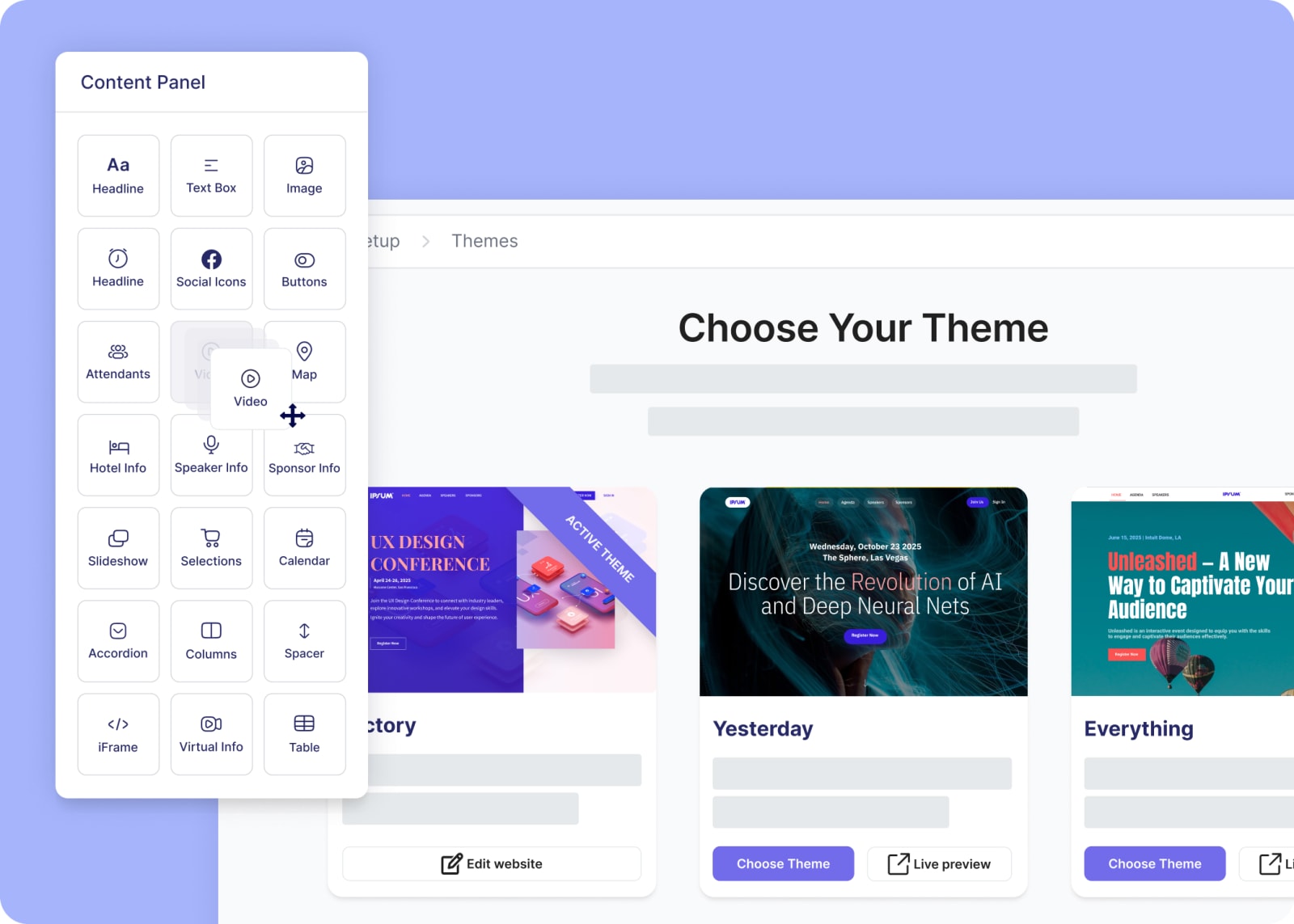
If you want to get your event up and running quickly, a drag-and-drop interface makes all the difference. Build event pages without writing code, and arrange elements like agendas, speaker bios, and venue details without submitting any tickets. You shouldn’t need a specialist to spin up and update your event website.
Customizable registration paths
Want a strong event registration flow? Don’t make everyone slog through the exact same form!
Instead, choose an event registration tool with conditional logic that shows (or hides) fields based on what someone selects.
- VIPs: Show them the good stuff—exclusive dinners, private sessions, the fancy perks.
- Speakers: Don’t make them dig. Route them straight to session details and submission info.
- Sponsors: Collect booth details, logo uploads, lead retrieval needs, and billing info right away.
When people only see the info they care about (and nothing they don’t), they actually finish registering. It’s as simple as that.
Agenda and session management
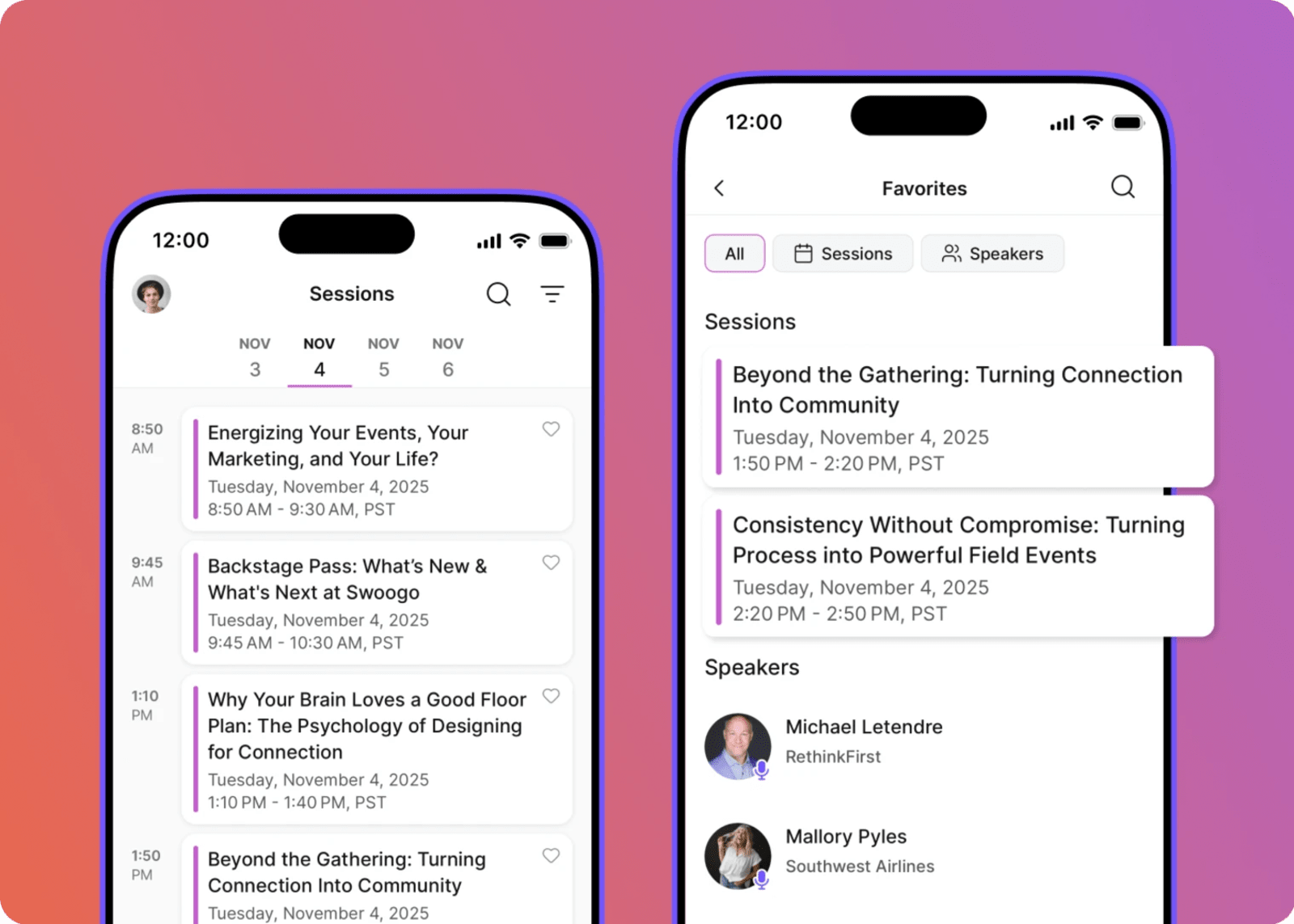
An agenda is NOT the same thing as a schedule. 🙅
It’s a living, breathing organism that changes every time someone says, “Quick update...”
To keep it in check, you need to be able to control every detail:
- Build multi-track agendas
- Set session capacity limits
- Create session-level waitlists
- Assign speakers and moderators
- Hide or show sessions based on registration type
- Let attendees build their own schedules
If you’re managing anything of the above in a spreadsheet, your event management software simply isn’t pulling its weight.
Integrated payment processing
It’s all about the Benjamins (baby), and to get them, you need to make paying ridiculously easy.
You need secure checkout via all the ways attendees want to pay (credit card, wire transfer, etc.), multiple reg types, discount codes, tax handling if needed, all tied directly into Stripe or your preferred payment gateway.
When payments live inside your event platform, reporting is cleaner, reconciliation is easier, and your finance team doesn’t send you passive-aggressive emails. 🙃
Swoogo users get access to easy event payments, including:
- Multiple payment methods, including credit card, check, wire transfer, invoice, purchase order, or custom method.
- Secure, trusted payment integrations, including Stripe, Authorize.net, PayPal Payflow Pro, credit cards, wire transfers, and more.
- Flexible pricing options with discounts, early bird rates, and payment plans to meet your attendees where they are.
- Configurable service fees to offset unforeseen operational costs.
- Hassle-free refund processing to handle cancellations with confidence.
- Robust transaction reporting with insights ranging from quick pulse checks to year-over-year trends.
Event cloning for easy replication
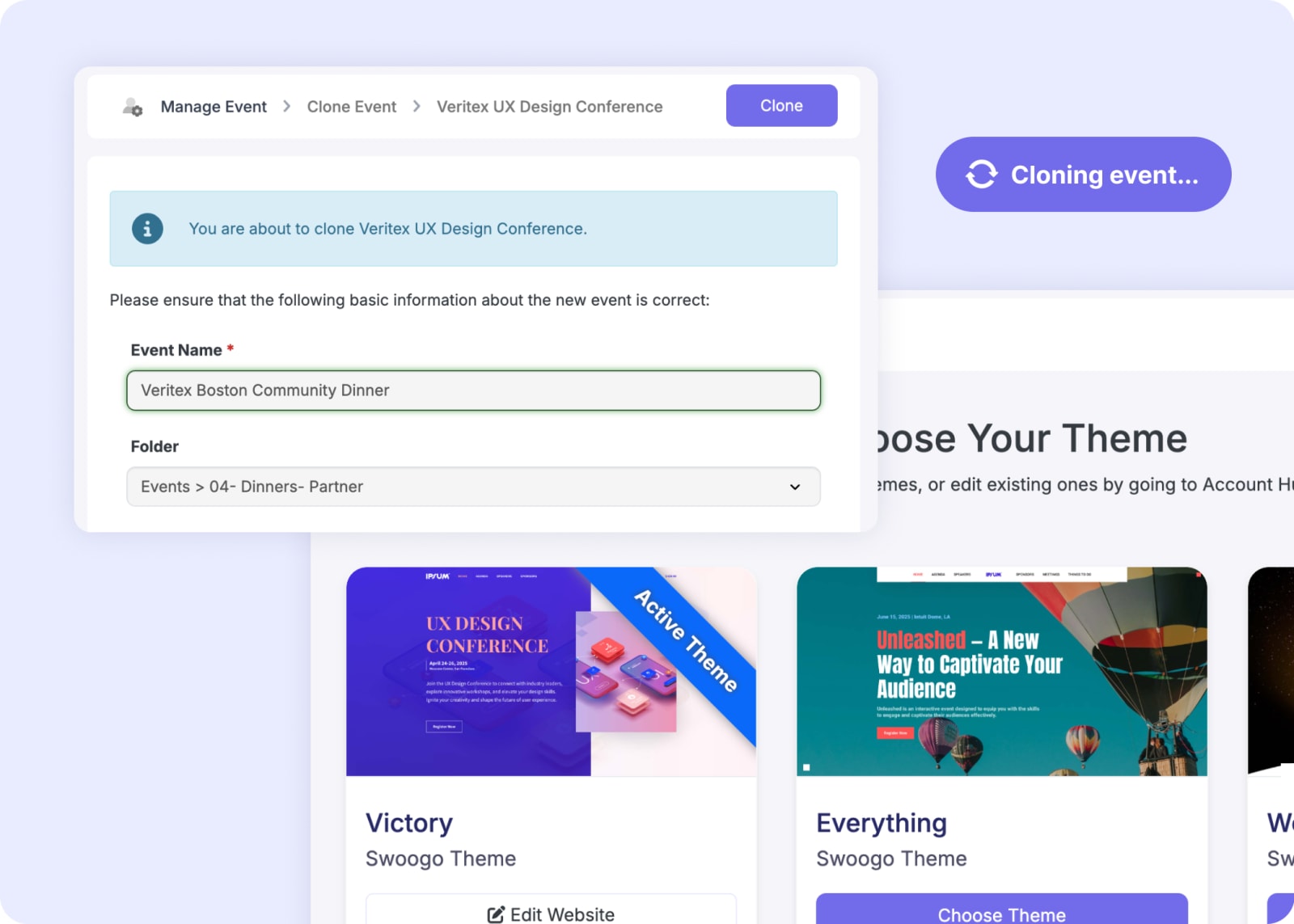
If you run multiple similar events—roadshows, regional summits, recurring conferences—cloning is another non-negotiable. 🐑
You should be able to:
- Duplicate registration pages or entire event sites
- Copy workflows
- Reuse emails
- Replicate agenda structures
Listen, it’s not 2000. You shouldn’t have to rebuild the same event from scratch 12 times a year.
2. Event marketing
If no one knows your event exists, how in the world are they going to show up?! Hint: They aren’t. 🫨
That’s why event marketing features earn the #2 spot on our list of must-haves.
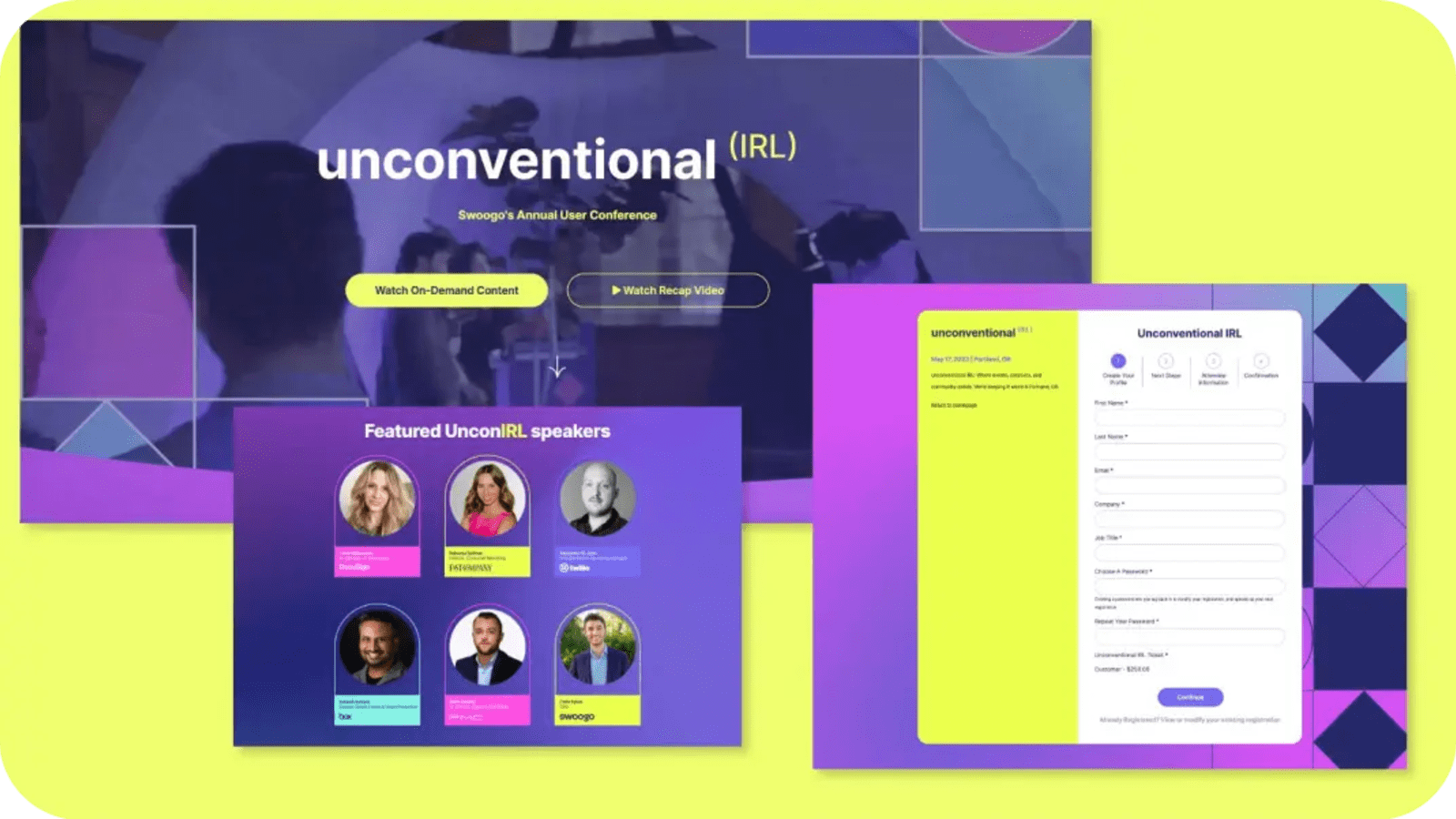
Registration website
First stop? Your registration website—a.k.a. your conversion engine. Look for event management software features that’ll give you:
- Full branding control
- Mobile optimization
- SEO-friendly structure
- Custom domains
- Fast load times
If your website looks and feels professional, attendees will assume your event will be the same. And when it’s easy to navigate and quick to load, they’re far more likely to register.
Email communications and automations
You need built-in email tools that handle every stage of your event.
Think: targeted invitations, confirmations, approval emails, reminders, pre-event emails to build excitement, day-of instructions, and even post-event follow-ups.
And they should be:
- Easy to set up
- Automated
- Personalized
- Triggered by reg type and behavior
Exporting lists just to send an event reminder email? Please no.
Track the marketing metrics that matter
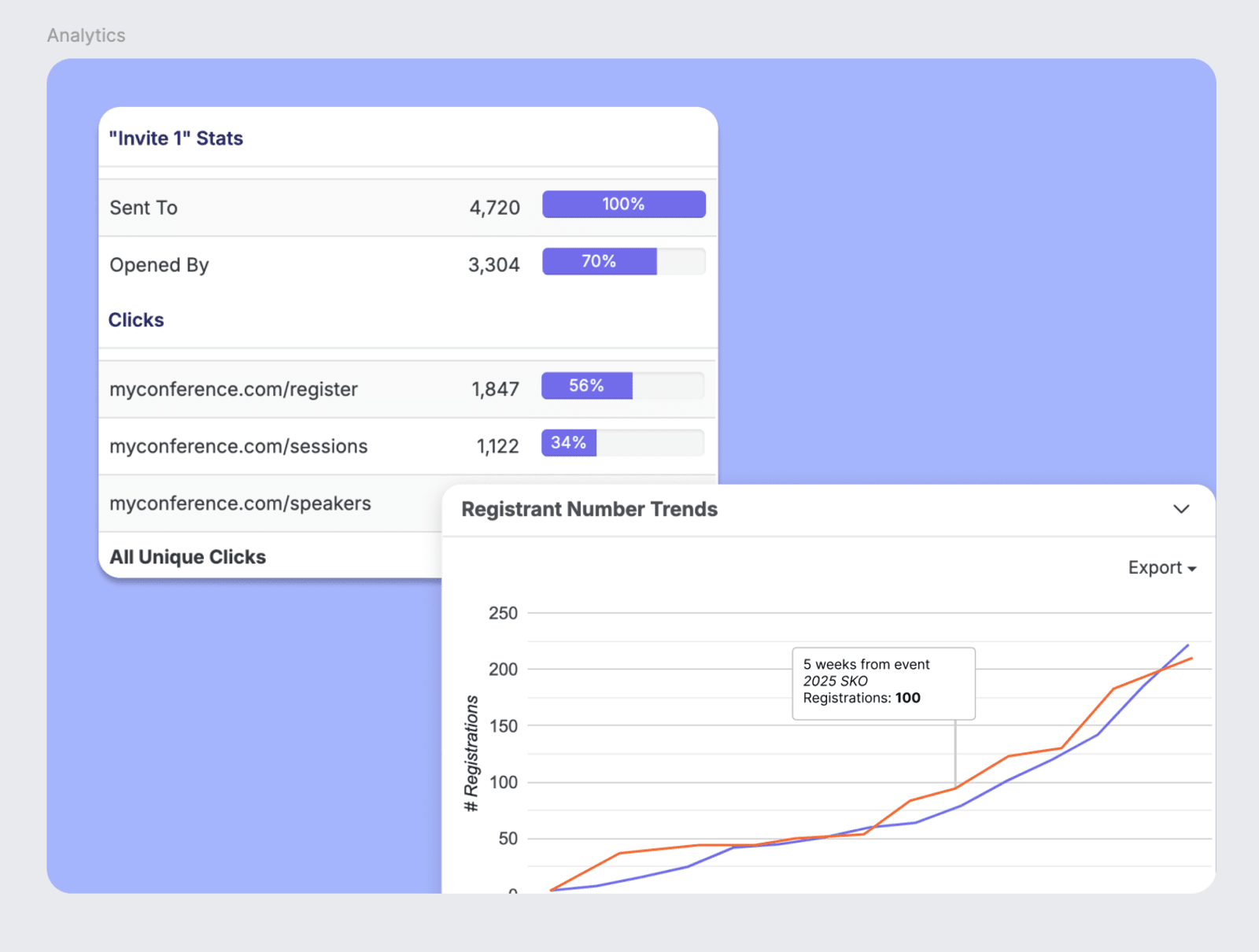
And how will you know all that event marketing is actually working? Your event software should show you.
It should let you track the metrics that matter most to your team, from email engagement to top traffic-driving channels.
That means:
- Real-time insights into registration trends
- Visibility into which campaigns or traffic sources are converting best
- Email performance tied directly to attendee behavior
- Clear reporting on where your traffic is coming from
Data > guesswork. Every time.
3. Attendee management
Once registration opens, it’s not just about who signs up—it’s about managing what happens next.
These are the features that keep everything (dare we say, miraculously) smooth.
Automated waitlists and capacity management
Every event has limits. Your event management software should let you set overall event capacity limits—and automatically move people from the waitlist when spots open up.
The system should simply handle it. And by “system,” we don’t mean Jessica heroically tracking names in a side spreadsheet and trying to remember who registered first.
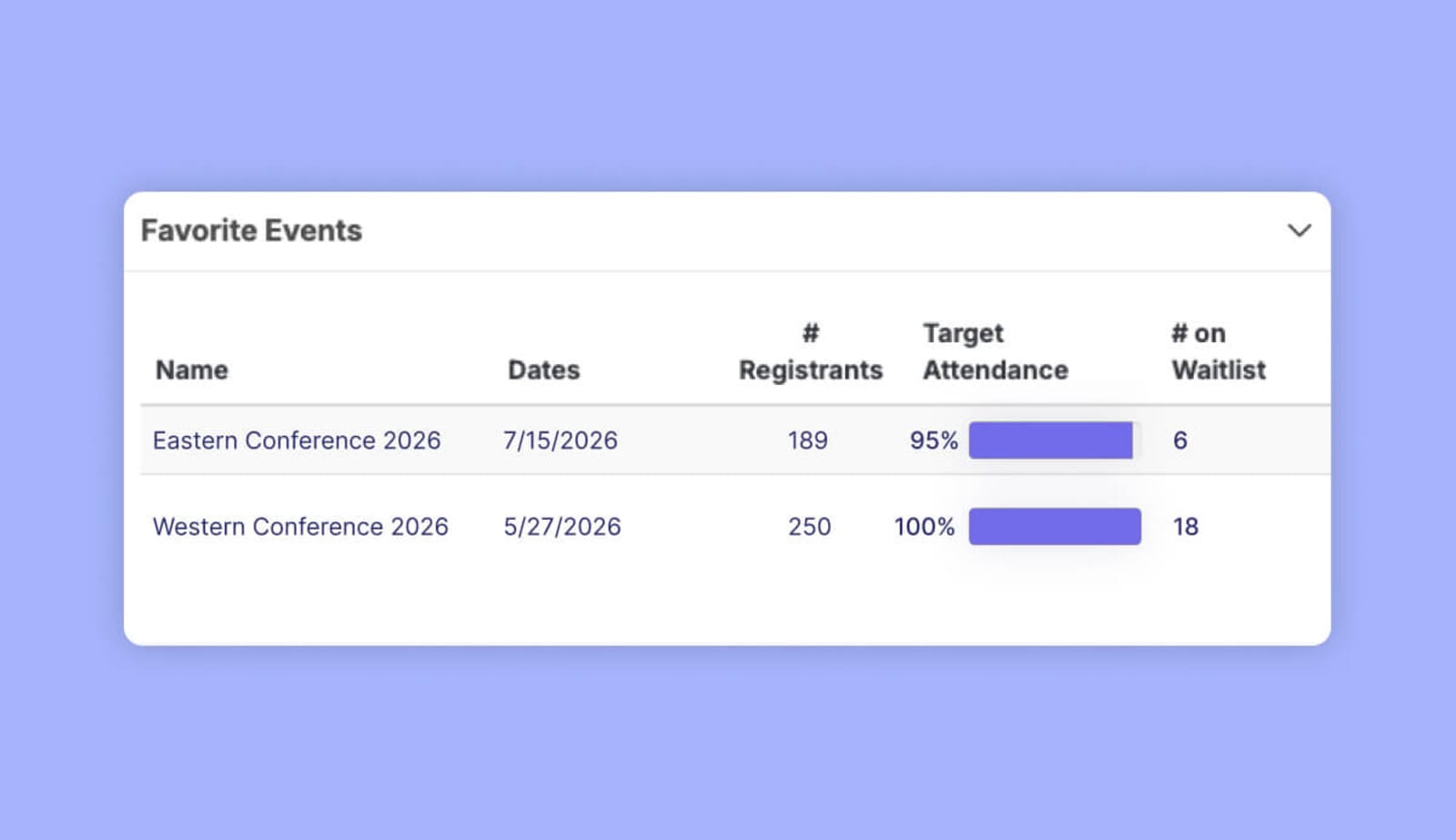
With Swoogo, you'll get a clearer view of event demand by surfacing the number of people on each event's waitlist. View waitlists event by event, or add waitlist data to your unified events dashboard to compare and analyze trends across all of your events.
Bulk actions for large lists
Events come in all shapes and sizes, from intimate executive dinners of 20 to flagship conferences with 1,000+ attendees. Managing a 20-person list hands-on isn't the end of the world. But once your list starts scaling, bulk actions become non-negotiable.
You should be able to update statuses in bulk, assign tags, and export segmented lists in seconds.
4. Attendee engagement
For you, events are often timelines and logistics.
But for your attendees? They should be filled with connection, insight, and even a little magic. ✨
If your platform can’t support the engagement that makes that possible, everybody misses out.
Mobile event app
Your events don’t just happen at the venue—they also live in people’s pockets.
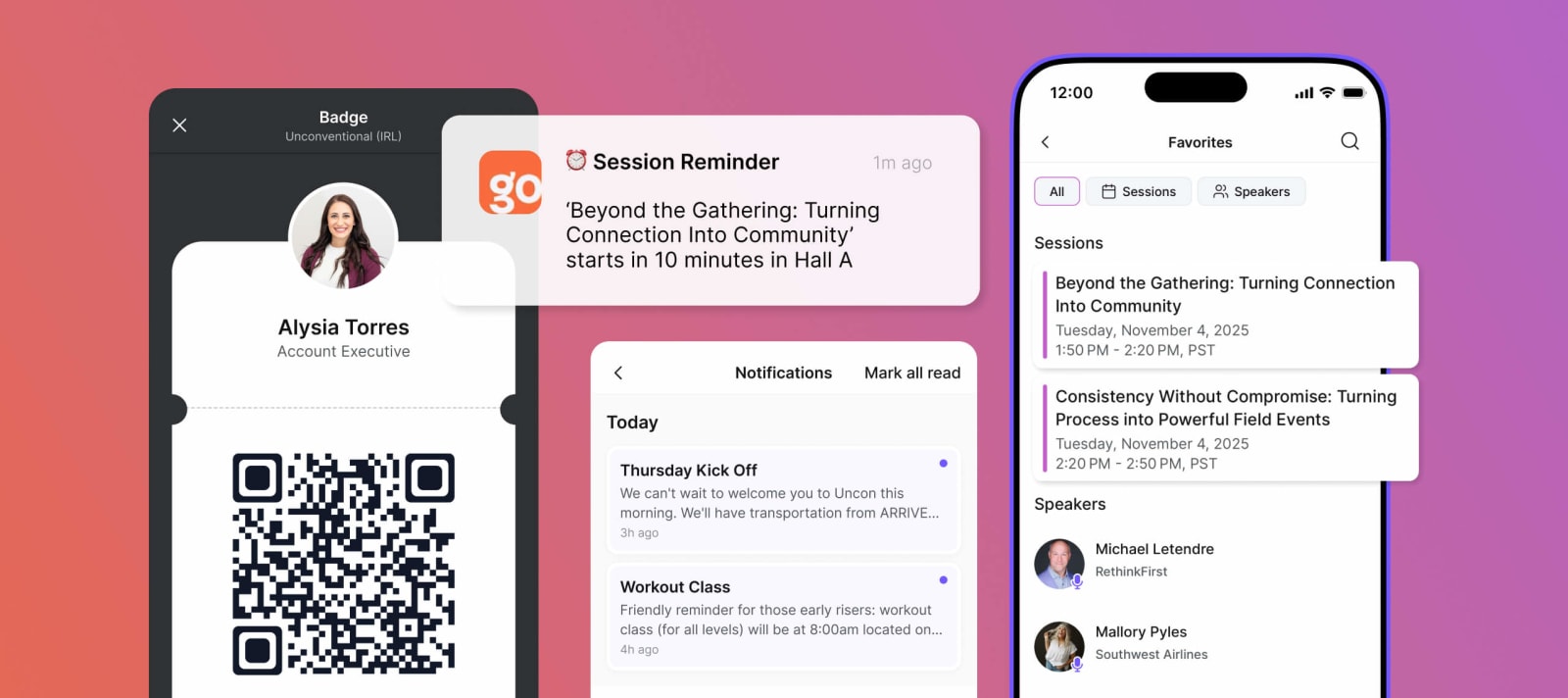
To keep your attendees engaged, choose a tool that lets them build personalized agendas, plus pick favorite sessions and speakers right from their phones.
Your mobile event app should also keep them in the loop with event-wide updates, targeted push notifications, and built-in chat so people can actually connect on the spot.
Networking is awkward enough. Make it easier, and you’ll win a ton of points.
Let attendees modify registration
Engagement isn’t just about content. It’s about control.
If plans change (and they will!), attendees should be able to manage their own registration without jumping through hoops.
That means they can:
- Update their information
- Swap sessions
- Upgrade their reg type
- Cancel if needed (sad, but real)
All without waiting in line or emailing your team while they’re supposed to be having a good time.
5. Sponsor management
The best event management software features don’t just support attendees. They support the people helping fund the whole thing: the sponsors.
And those sponsors don’t invest in your event for a logo on a slide. They want visibility, engagement, and proof it worked (they need to justify their spend, too). And when past sponsors see success, it'll make it easier to retain partnerships and secure new ones down the road. Your platform should help you deliver on all three.
That means:
- Dedicated sponsor pages on your event website
- Featured placements and shout-outs in your mobile app
- Branding opportunities across in-person and virtual experiences
- Real attendee engagement (not just passive impressions)
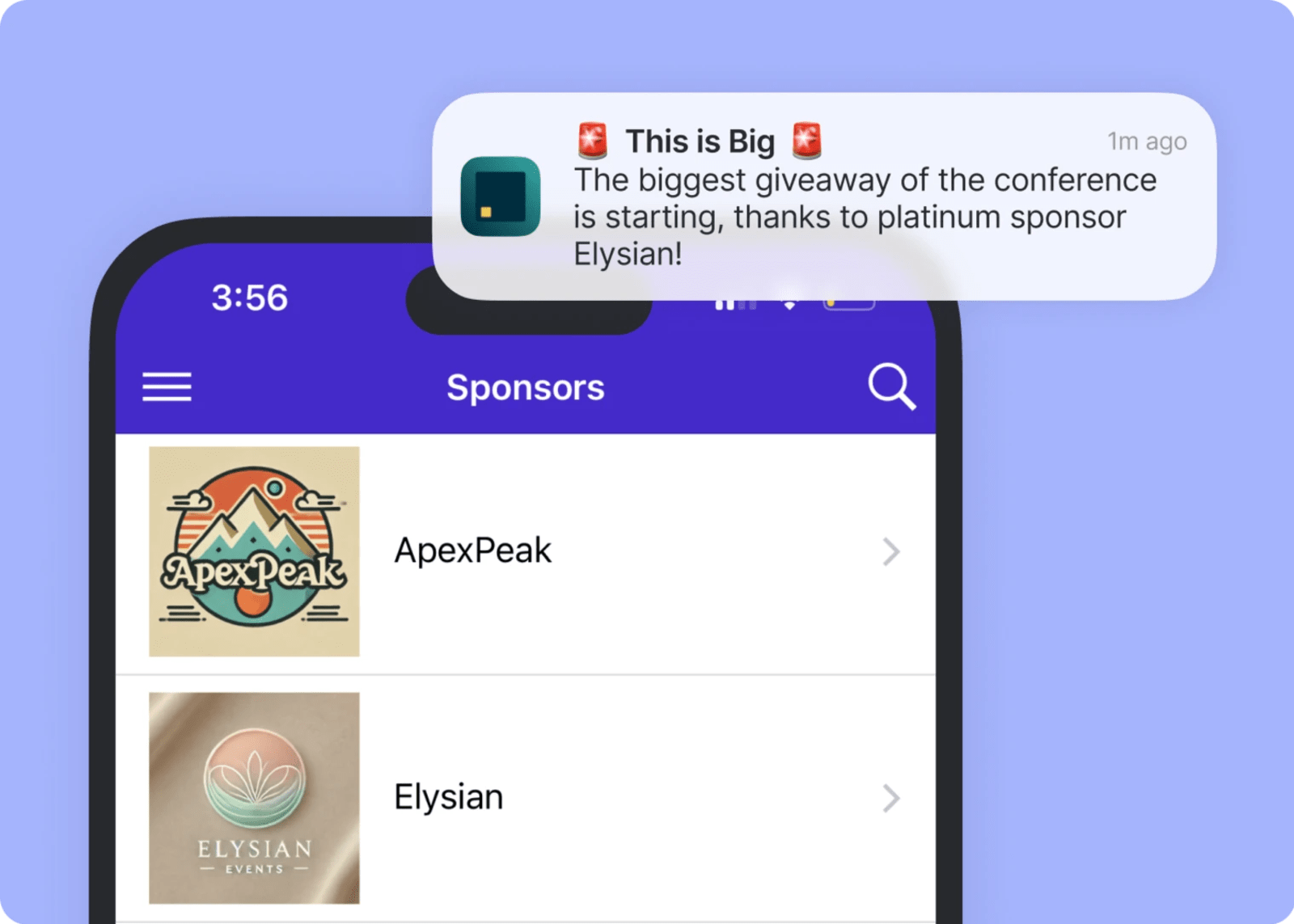
When it’s all said and done, you should be able to pull a custom report that shows exactly what they got out of it and why they should keep coming back. 🫰
6. Onsite check-in tools
The truth is that most event management features look great in a demo.
Let’s talk about the ones that actually hold up when 300 people show up. At once. Before you’ve even grabbed a coffee.
QR codes
The golden rule of every event: check-in should take seconds.
With QR codes, attendees can scan and go—no alphabetized lists, no frantic name-hunting while the line starts judging you.
QR-based check-in is the fastest route to clean attendance data. You know exactly who showed up and when, which means better attendance tracking, more accurate reporting, and real proof of engagement.
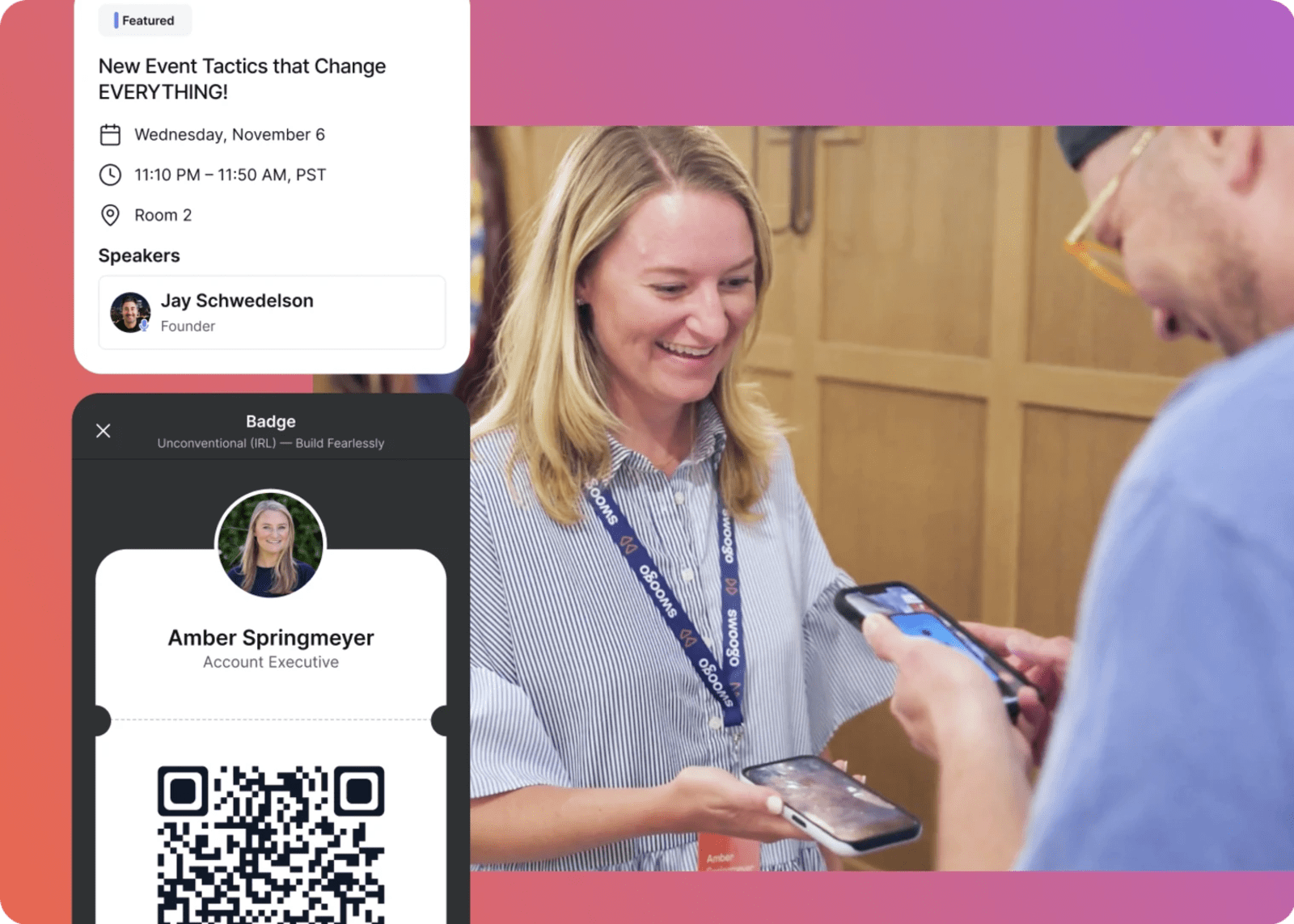
On-demand badge printing
Let’s retire the tradition of pre-printing 3,000 badges and hoping nothing changes.
Because something always changes.
Names get misspelled. Tickets get upgraded. People register on the morning of. And some just don’t show up at all (pour one out for the badge graveyard). 🫡
Pre-printing badges turns minor updates into logistical chaos. On-demand printing fixes that. If a detail changes, you update it and print. Done.
7. Data and analytics
Events are expensive. You should know exactly what they’re delivering. That means seeing the whole picture:
👉 Who’s visiting your event site
👉 Who’s opening (and actually clicking) your emails
👉 Who’s registering—and who’s ghosting at the last step
From there, track performance all the way to final ROI with insights you can actually use.
“We think it worked” won’t survive a budget review, but you know what will? 👇
Cross-event reporting
One event is a snapshot. Your program is the story.
Cross-event reporting lets you zoom out and see performance across multiple events—or year over year—so you’re not making decisions in a vacuum.
Choose an event management software that lets you:
- Compare registration trends across regions
- Track growth over time
- Spot your highest-performing formats
- Double down on what’s actually driving results
Remember, data gives you confidence, and confidence gives you budget. 💸
Custom report building
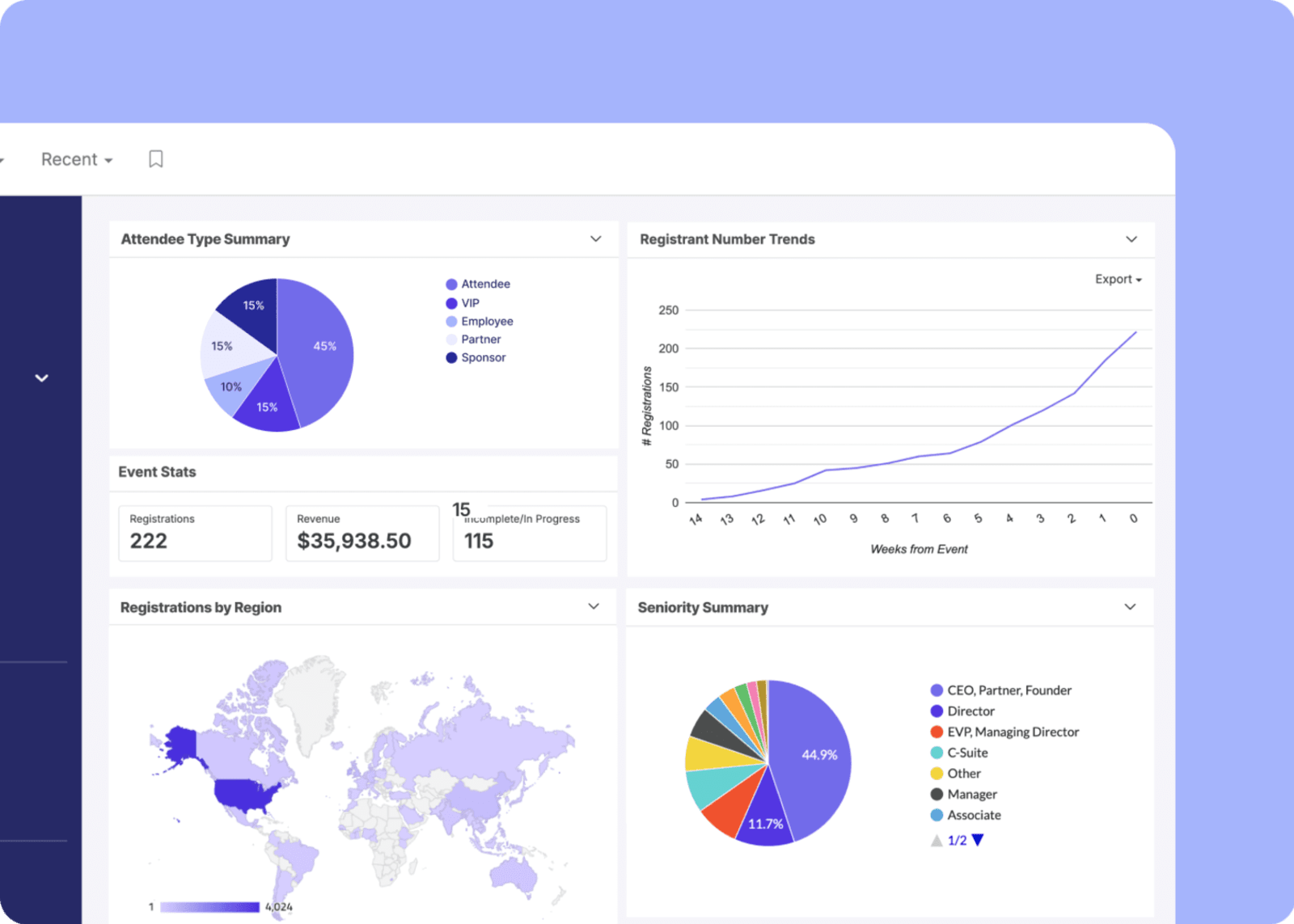
First, you need the basics covered: pre-built reports for registrations, sessions, speakers, and sponsors.
But that’s table stakes.
The real power is being able to build custom reports and dashboards that slice your data the way you need it—by region, campaign, ticket type, engagement level, whatever matters most.
That’s how you’ll be able to turn raw numbers into cooked-to-perfection decisions.

“The depth of reporting in Swoogo is unmatched. We were able to connect pre-event behavior, onsite interactions, and post-event follow-ups directly to our sales pipeline—something we'd never been able to track before.”Michael Letendre, Marketing Operations, RethinkFirst
8. Integrations
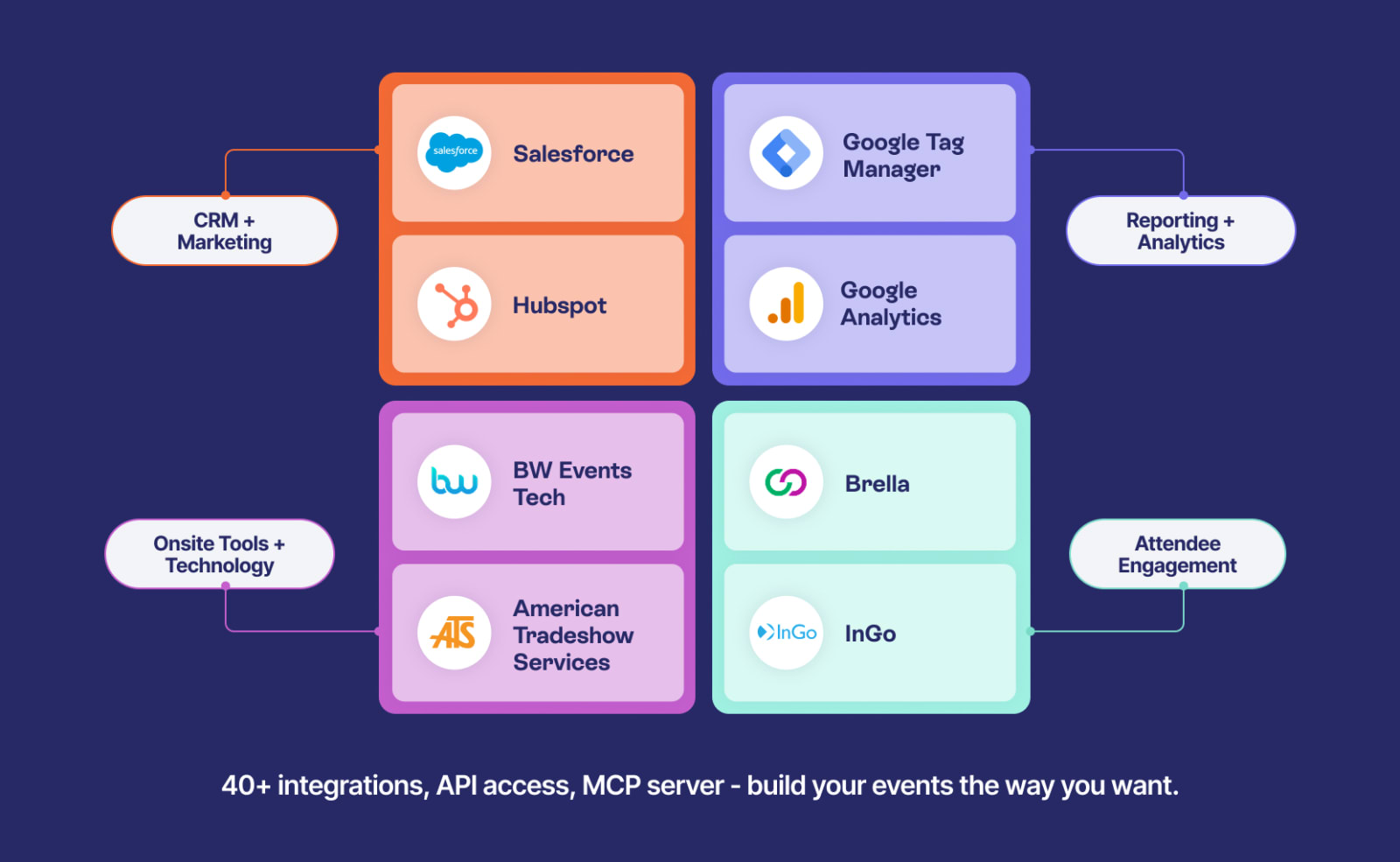
And last, your event management tool can’t live alone on its own little island. ❌
It needs bridges. Ferries. Established trade routes.
At Swoogo, we connect directly to the tools event teams use every day:
Your attendee data and reporting? That should flow straight into your CRM—Salesforce, HubSpot, and Marketo—automatically.
Payments? They need a secure gateway like Stripe, Mollie, ACI Worldwide, or TouchNet.
Attendee engagement tools like Brella and Pigeonhole Live? Their data should sail back into your system, not live off to the side.
And for all the other tools floating around your stack? That’s where Zapier comes in.
If you’re manually uploading CSVs after every event, your tech stack isn’t integrated. It’s stranded. 🏐
Questions you can ask event software vendors
Have an event tool on your radar, but aren’t sure if it passes the test? Here are some questions you can whip out:
- Can you walk me through your options for creating custom registration paths?
- How does your mobile app work for attendees and organizers?
- How much can we customize the registration pages, emails, and event website?
- What reporting and analytics capabilities do you offer?
- Do you integrate with [insert your ride-or-die tools here]?
- How do you handle data security and GDPR/privacy compliance?
- Are there per-attendee fees, add-ons, or support tiers we should know about?
- What does support look like during event week?
- What does implementation actually look like—timeline, resources, training?
The right features change everything
The right event management software features don’t just help you run events.
They help you:
- Scale your program
- Reduce manual work
- Prove ROI
- Create better attendee experiences
- Stop living in spreadsheet purgatory
If you’re running multiple in-person or hybrid events per year and your current setup feels like it’s working against you…it might be time to upgrade.
We built Swoogo for teams who want power and control—without needing a developer on speed dial or a six-figure pro services contract.
If that sounds like your vibe, come hang out with us! Book a demo. Take a load off. We promise to answer all the questions we suggested above (and more).
FAQ on Event Management Software and Features
How much does event management software cost?
Short answer: It depends.
Longer answer: Most event management software pricing falls into one of three buckets 👇
- Per-event pricing: You pay for each event individually. Good for occasional events. Gets expensive fast if you run a program.
- Annual licensing: Flat annual fee for unlimited or capped events. Better for teams running multiple events per year.
- Tiered pricing: Different feature sets at different price points. Watch closely here—sometimes “basic” means “missing something critical.”
Now, the part vendors don’t always highlight: hidden costs. These include:
- Per-attendee fees
- Paid support tiers
- Implementation fees
- Professional services just to configure basic workflows
And then there’s the biggest hidden cost of all: your team’s time.
A cheaper platform that requires constant workarounds, manual exports, or outside help isn’t actually cheaper. It just moves the cost somewhere else.
Look for tools with predictable pricing, clear inclusions, and transparency around what’s extra. Platforms built around flat annual pricing with unlimited events and registrations (like Swoogo) remove a lot of that guesswork.
What’s the difference between event management software and event registration software?
Think of event registration software as one piece of the puzzle.
It handles:
- Registration forms
- Ticketing
- Payment processing
- Basic confirmation emails
Event management software does all of that—and everything that happens before, during, and after.
That includes:
- Agenda and session management
- Marketing tools and automation
- Attendee management
- Onsite check-in and badging
- Mobile apps and networking features
- Sponsor management
- Reporting and analytics
- CRM integrations
Event registration is a feature. Event management is the full system.
Do I need different software for virtual vs. in-person events?
You shouldn’t.
Event programs rarely live in just one format anymore. You’ve got in-person conferences, hybrid streams, executive dinners, webinars, and regional roadshows—often all in the same quarter.
Your event software should support all of it without forcing you to duct-tape tools together.
The core needs don’t change: registration, communication, engagement, and reporting. The delivery format does.
The right event management software features make it easy to reuse templates, clone events, toggle between virtual and in-person setups, and track engagement across every format—all in one tool.
How long does it take to implement event management software?
/imageMost event platforms require 2 to 3 months (sometimes more) to fully implement, especially if they rely heavily on custom builds or professional services to get you up and running.
If speed matters, look for tools designed for faster onboarding. Swoogo customers are typically live in about a month, so you can get back to running events.p
This post was originally published in September 2024, and has since been updated for freshness and accuracy.