

Most pre-event emails land with all the excitement of a meeting reminder.
"Save the date." "Here are the details." "Don't forget to register."
Yawn.
While most event marketers are sending those same tired emails, you're also running 10+ events a year and don't have time to reinvent the wheel with every send.
We pulled together 15 pre-event email templates that you can add to your event comms brief ASAP. The kind of “know before you go” email you can copy, tweak, and send without losing your mind. Each one is designed to drive registrations, reduce no-shows, and keep attendees engaged from announcement to showtime.
A quick note: These templates aren't meant to be used verbatim. Your event type, audience, and goals all matter as you tailor each send.
What are pre-event emails and why do they matter?
Pre-event emails are messages sent before an event to build excitement, share logistics, drive registrations, and reduce no-shows. They range from initial announcements to day-of reminders, and they directly impact attendance rates and event success.
Here's why they're non-negotiable:
- They build excitement. Nobody gets hyped about an event they forgot was happening. Pre-event emails keep your event top of mind and start building FOMO early.
- They reduce no-shows. High registration numbers with terrible attendance? That's the worst. Reminder sequences drastically cut down no-shows by keeping attendees engaged and prepared.
- They share critical info. Nobody wants to show up to the wrong location or miss the speaker they came for. Pre-event emails deliver the essential details—logistics, schedules, prep instructions—so attendees feel informed, not lost.
- They set expectations. Clear, consistent communication before an event builds trust. And trust makes everything else—sponsorships, upsells, post-event follow-ups—so much easier.
And a fun bonus? Automation makes it scalable. You don't have to manually send these emails. With event registration software like Swoogo, you can automate your pre-event email sequences while still personalizing them. Set it once, let it run, and focus on the million other things on your plate.
15 pre-event emails you can send (with examples and templates)
We've split these into two groups: emails for people who haven't registered yet and emails for people who already have. You wouldn't send the same message to someone who's all in versus someone still on the fence, so we’ve got you covered with options for both.
Pre-event email templates before registration
These emails drive awareness, create urgency, and convert interested people into confirmed attendees. If you want to get people on board? These are the templates you need.
1. Event announcement email template
Purpose: Tell your audience you're hosting an event and drive early interest.
Goal: Get people to your registration page and start the buzz.
Subject: 🎉 You're invited: [Event Name] is happening on [Date]
Body:
Hey [First Name],
Big news: We're hosting [Event Name] on [Date], and we'd love to see you there.
This isn't your typical [conference/summit/workshop]. We're bringing together [brief description of what makes this event special—speakers, topics, vibe].
Here's what you can expect:
- [Key benefit #1]
- [Key benefit #2]
- [Key benefit #3]
Sound like your kind of thing? Save your spot before tickets sell out.
[Register Now Button]
Can't wait to see you,
[Your Name]
[Event Team]
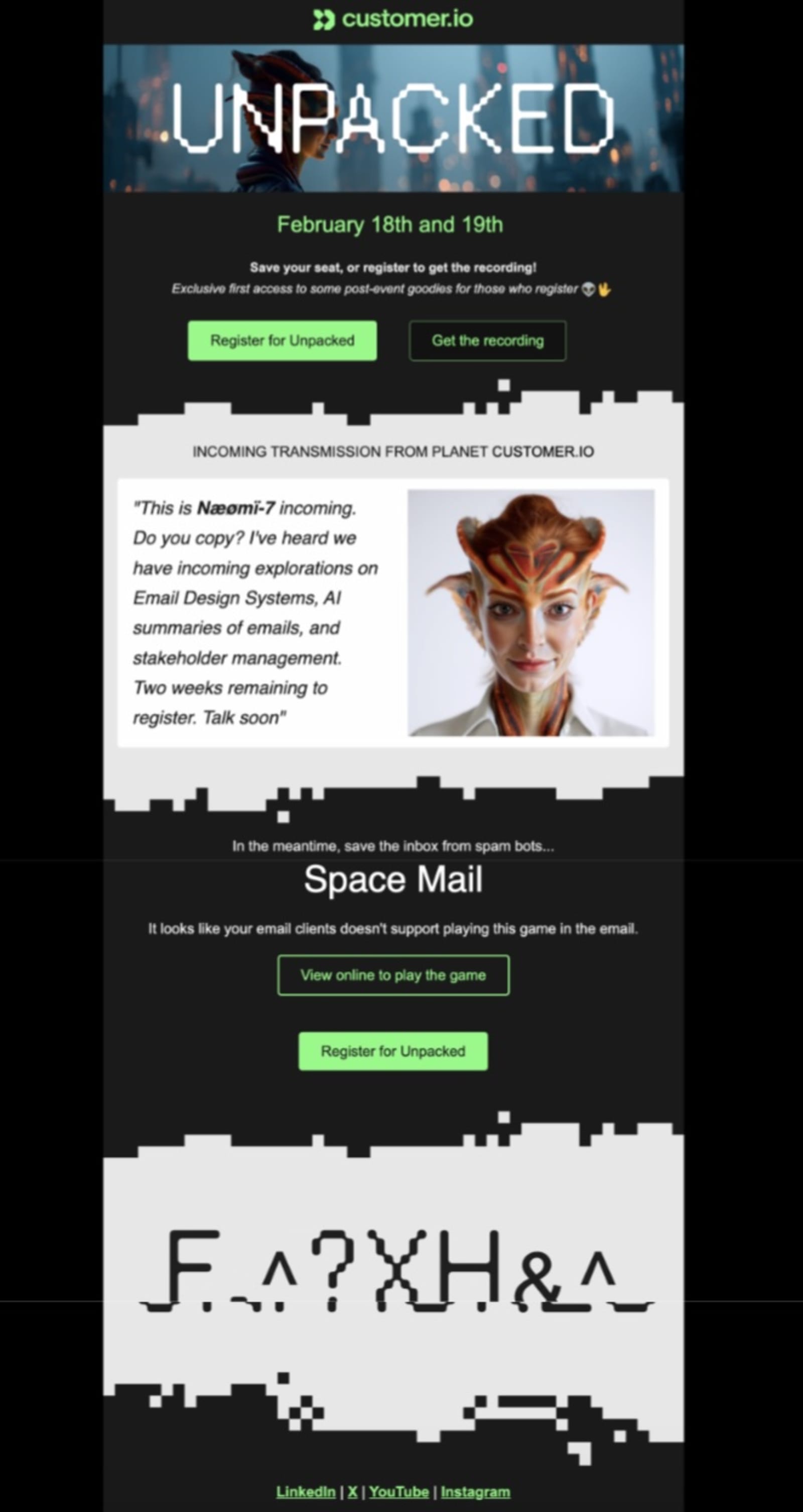
See Customer.io’s email as a great example of this type of email:
- Clear call-to-action (CTA) to drive event registrations
- Weird but interesting images to capture attention from those who quickly click sift through their inbox
Remember: You don’t have to follow these exact templates, and you should customize them heavily to match your branding and tone of voice.
Here’s a killer example from Customer.io’s Unpacked. They have clear calls to action (in a stop-in-your-tracks, high-contrast CTA button, no less) and they share the event’s date, but they also have quirky branding to grab your attention fast.
2. Speaker announcement email template
Purpose: Spotlight featured speakers to generate excitement and drive registrations.
Goal: Convert fence-sitters into attendees.
Subject: 🎤 Just announced: [Speaker Name] is coming to [Event Name]
Body:
[First Name],
We just locked in [Speaker Name] for [Event Name].
[Speaker Name] is [their impressive credential or accomplishment]. They'll be sharing insights on [specific topic], and trust us—this is the session people will be talking about for weeks after.
Other confirmed speakers include:
- [Speaker 2 - Title/Topic]
- [Speaker 3 - Title/Topic]
Don't miss your chance to learn from the best. Register now to secure your spot.
[Register Now Button]
See you there,
[Your Name]
3. Early bird pricing email template
Purpose: Create urgency with a limited-time discount for early purchases.
Goal: Drive immediate registrations and reward early commitments.
Subject: ⏰ Early bird pricing ends in 48 hours for [Event Name]
Body:
Hey [First Name],
Final call: Early bird tickets for [Event Name] are about to disappear.
Lock in your spot before [deadline date/time] and save [discount amount].
Early bird perks:
✓ [Discount amount] off registration
✓ [Additional perks like VIP seating, exclusive content, etc.]
✓ [Another benefit like early access to session registration]
Once the deadline hits, prices go up. Don't wait.
[Grab Early Bird Tickets Button]
[Your Name]
[Event Team]
4. Ticket sale or registration announcement email template
Purpose: Announce that registration is officially open.
Goal: Launch your sales campaign and start generating registrations.
Subject: 🎟️ Tickets are live for [Event Name]
Body:
[First Name],
The wait is over. Registration for [Event Name] is officially open! 🎉
Join us on [Date] at [Location] for [brief event description highlighting what makes it valuable].
Why you should register now:
- 🤩[Reason #1]
- 🤩[Reason #2]
- 🤩[Reason #3]
Spots are limited. Secure yours before we sell out.
[Get Your Ticket Button]
See you soon,
[Your Name]
The University of Central Florida’s Otronicon event email does a great job explaining the benefits of their upcoming event, including networking opportunities, skill development, and career exploration. They also have a limited-time offer to leverage urgency and increase registrations.

5. Last-chance-to-register email template
Purpose: Create final urgency for hesitant prospects.
Goal: Convert warm leads before your registration closes.
Subject: ⚠️ Last chance: [Event Name] registration closes tonight
Body:
[First Name],
This is it. Registration for [Event Name] closes at [time + time zone] tonight. ⏱️
If you've been on the fence, here's why you don't want to miss this:
- [Reason #1, such as a great speaker]
- [Reason #2, such as a great networking event]
- [Reason #3, such as a an exciting location]
Grab your spot before it's too late.
[Register Now - Final Hours Button]
Time's almost up! Don’t miss your chance.
[Your Name]
[Event Team]
6. Retargeting email template
Purpose: Re-engage people who showed interest but didn't register.
Goal: Convert warm leads with personalized messaging.
Subject: We noticed you checked out [Event Name]—still interested?
Body:
Hey [First Name],
We saw you were looking at [Event Name], but you didn't finish registering. No worries—we get it. Life gets busy.
But here's the thing: This event is filling up fast, and we'd hate for you to miss out.
Quick reminder of what's happening:
- ⭐[Key highlight #1]
- ⭐[Key highlight #2]
- ⭐[Key highlight #3]
Sound good? Register now before spots run out.
[Complete Your Registration Button]
[Your Name]
[Event Team]
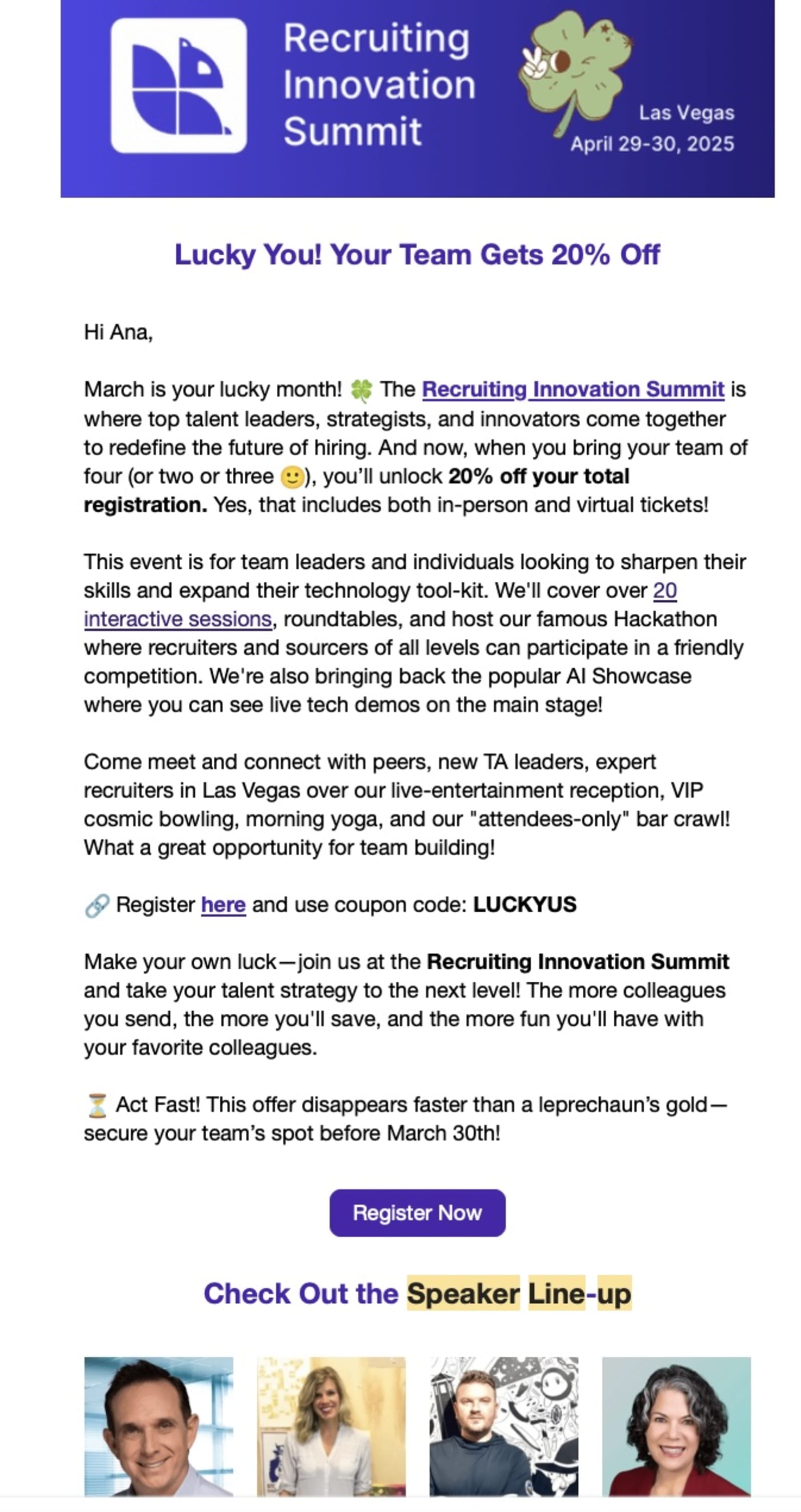
Want to go for a more long-form approach? Here’s an example.
ERE’s Recruiting Innovation Summit sent this email to existing subscribers. It does a great job of highlighting key features, like 20 interactive sessions and their famous Hackathon.
Pre-event emails for registered attendees
These emails keep registrants engaged, prepared, and excited so they actually show up. You can also use them to get the info you need to personalize attendees’ events.
7. Thank-you-for-registering email template
Purpose: Confirm registration, express gratitude, and set expectations.
Goal: Make registrants feel valued and start building anticipation.
Subject: 🙌 You're in! Here's what happens next for [Event Name]
Body:
[First Name],
Thanks for registering for [Event Name]! Your spot is confirmed, and we're pumped to have you.
Mark your calendar:
📅 [Date]
📍 [Location]
🎫 Confirmation: #[Number]
What to do next:
- Add the event to your calendar → [Calendar Link]
- Download the event app → [App Link]
- Browse the schedule → [Agenda Link]
Bringing your team? Share this discount code for [X]% off: [CODE]
Can't wait to see you,
[Your Name]
P.S. Follow #[EventHashtag] to connect with other attendees.
When the Swoogo team went to Inbound 2025, we put together a ping pong tournament because… well, why not? We had fun with the activation and the emails leading up to it. 👇

8. Event details email template
Purpose: Share comprehensive information about agenda, location, sessions, and logistics.
Goal: Equip attendees with everything they need for a smooth experience.
Subject: 📋 Your complete guide to [Event Name] (Save this!)
Body:
Hey [First Name],
[Event Name] is [X days] away. Here's everything you need to know.
Your Personalized Agenda:
Day 1 - [Date]
8:00 AM - Registration & Breakfast
9:00 AM - Keynote: [Topic/Speaker]
10:30 AM - Breakout Sessions (choose your track)
12:00 PM - Networking Lunch
[Continue with key sessions]
Quick Links:
📱 Event app: [Download]
📍 Venue map: [Interactive link]
🚗 Parking info: [Details]
💬 Join the Slack community: [Link]
Questions? Just reply to this email.
See you soon,
[Your Name]
[Event Team]
9. Know-before-you-go email template
Purpose: Provide key logistics and prep info for a smooth arrival.
Goal: Reduce day-of confusion and support a confident arrival experience.
Subject: 🧳 Everything you need before [Event Name]
Body:
[First Name],
[Event Name] is almost here! A few quick reminders to make sure you're all set:
What to bring:
- Photo ID for check-in
- Confirmation email (or just have this handy)
- Business cards for networking
- [Any other essentials]
Getting there:
📍 Address: [Full venue address]
🚗 Parking: [Instructions]
🚇 Public transit: [Nearby stops]
What to expect:
- Doors open at [time]
- Breakfast/coffee available starting at [time]
- First session kicks off at [time]
Download the event app for real-time updates: [Link]
See you tomorrow!
[Your Name]
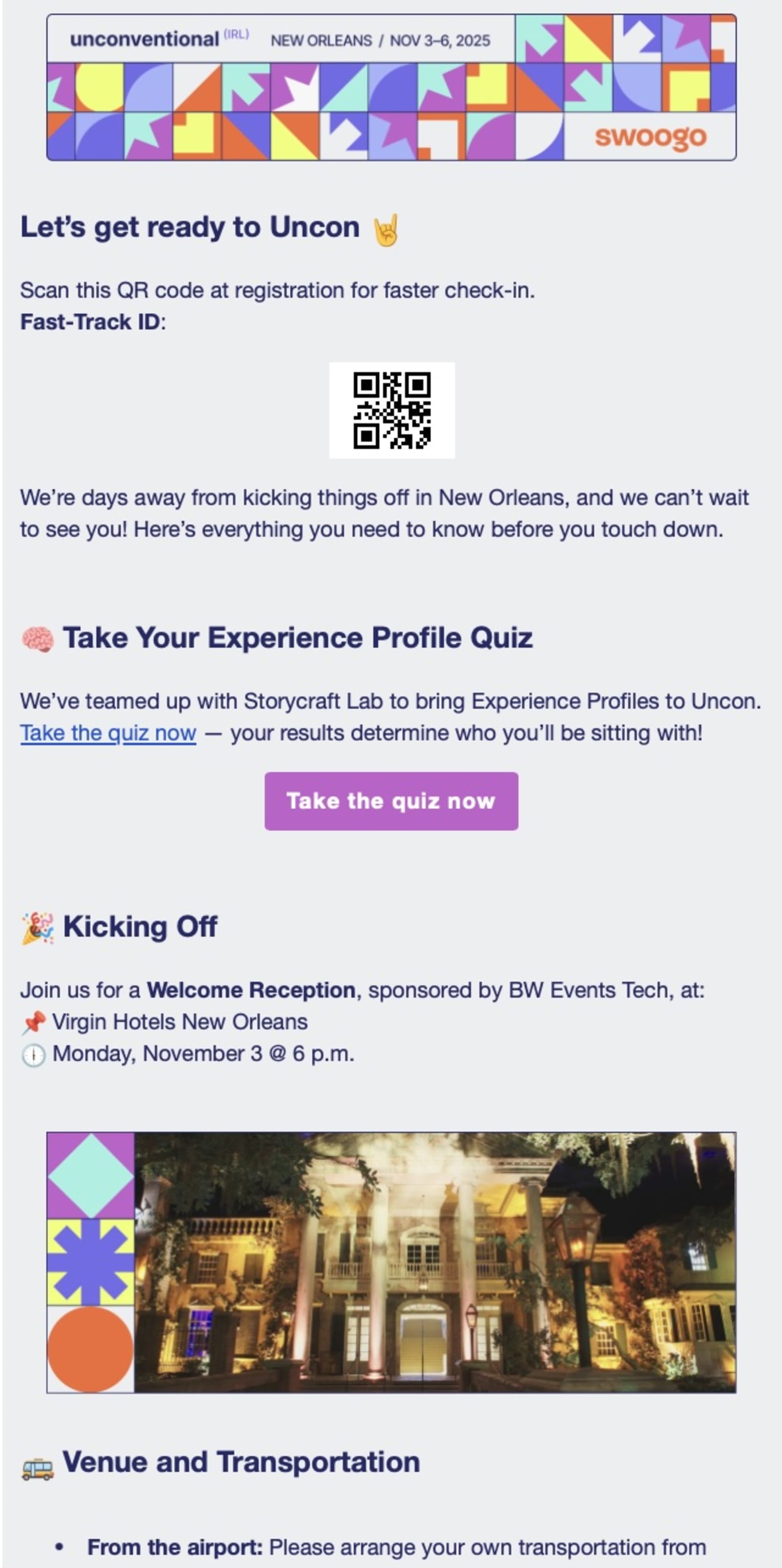
Looking for an example of what this might look like in practice? Swoogo’s UNCON event sent multiple emails that gave registrants what they needed to get started. This email has a QR code for lightning-fast check-in, a quiz to determine who you’ll be sitting with based on your experience profiles, and a reminder about the Welcome Reception.
10. Schedule announcement email template
Purpose: Share the full event agenda.
Goal: Help attendees plan their day and reduce decision friction.
Subject: 📅 The [Event Name] schedule just dropped
Body:
Hey [First Name],
The full agenda for [Event Name] is here, and it's packed.
Highlights you won't want to miss:
- ✨[Session 1 - Time/Speaker]
- ✨[Session 2 - Time/Speaker]
- ✨[Session 3 - Time/Speaker]
View the complete schedule and plan your day: [Link to full agenda]
Pro tip: Download the event app to build your personalized schedule and get session reminders throughout the day. [Link to event app]
[View Full Schedule Button]
See you there,
[Your Name]
11. Event reminder email template
Purpose: Send countdown nudges to keep your event top of mind.
Goal: Minimize no-shows and boost actual attendance.
Note: Send multiple versions—7 days out, 24 hours out, and morning-of.
Subject: ⏰ [Event Name] is tomorrow! Here's what you need.
Body:
[First Name],
[Event Name] is tomorrow, and we're getting everything ready for you.
Quick Reminder:
📅 Date: [Tomorrow's date]
🕒 Time: [Start time]
📍 Location: [Venue name and address]
Before you head out:
- Download the event app: [Link]
- Review the schedule: [Link]
- Check parking/transit info: [Link]
We'll see you bright and early. Can't wait!
[Your Name]
[Event Team]
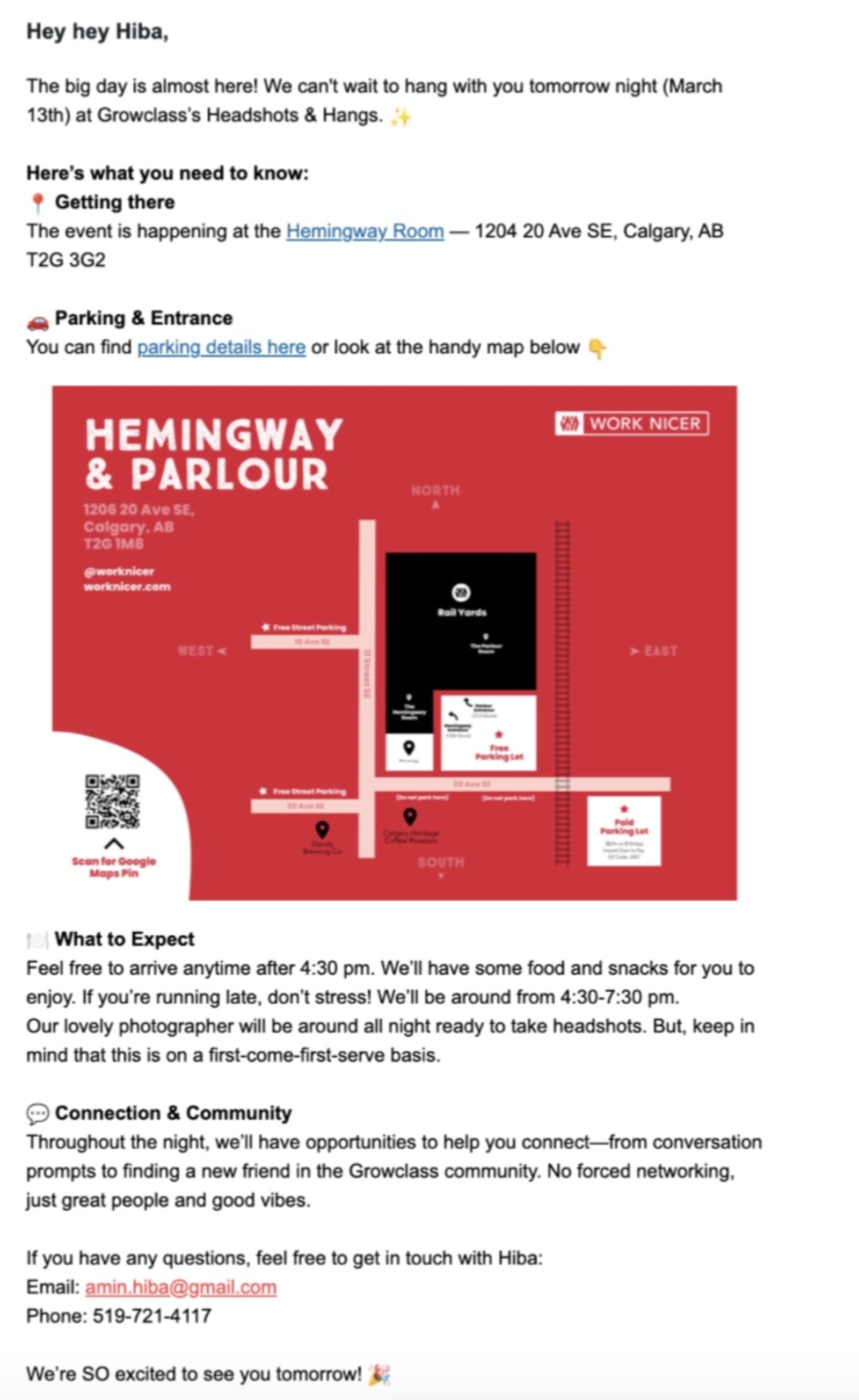
This is a great example of what this email could look like, courtesy of Growclass. This event features the most important information at the top of the email, including the address, parking details, and what to expect when attendees arrived.
12. Final details email template
Purpose: Provide last-minute reminders and essential details.
Goal: Eliminate confusion and support a seamless event experience.
Subject: ☕ [Event Name] starts in [X] hours—final checklist
Body:
Good morning [First Name],
[Event Name] kicks off in just a few hours. Here's your final checklist:
✅ Event starts at [time]
✅ Location: [Venue name, address]
✅ What to bring: [ID, confirmation, business cards]
✅ First session: [Session name at time]
Last-minute questions? Reply to this email or find us at the registration desk.
We're so excited to see you today!
[Your Name]
[Event Team]
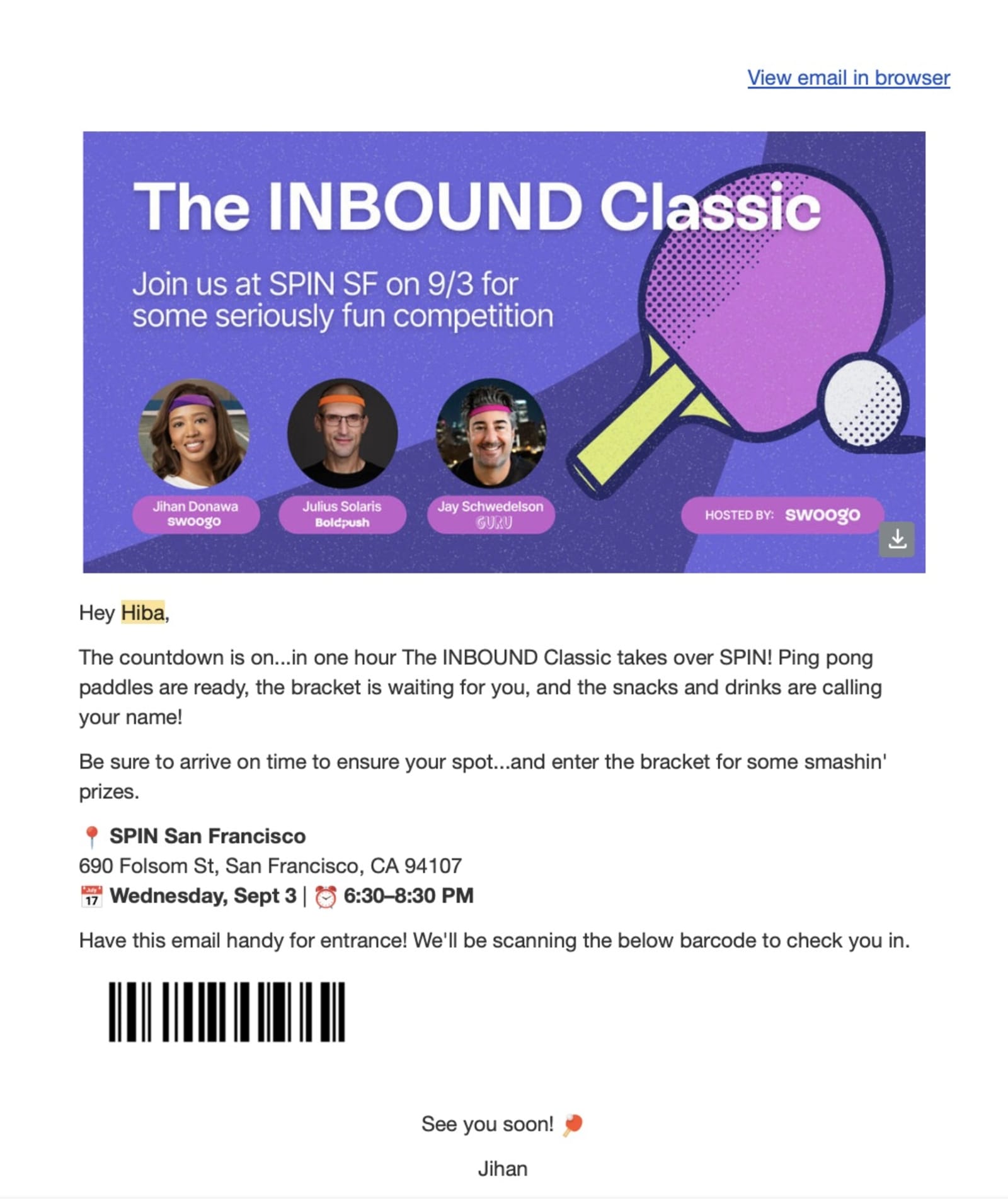
Here’s a great example of how you can drive hype and attendance with a last-minute email that the Swoogo team sent when we hosted our INBOUND classic in 2025. It’s short and to-the-point, but it reminds people that the event is starting soon (one hour!), where to go, and to have the email on-hand for fast check-in.
13. Event highlights email template
Purpose: Share what's new or exciting to maintain mid-cycle engagement.
Goal: Keep momentum high and encourage any remaining fence-sitters.
Subject: 🔥 The top 5 things you can't miss at [Event Name]
Body:
[First Name],
[Event Name] is [X] days away. Here are the highlights everyone's talking about:
- 🎤 Keynote with [Speaker Name]: [One-sentence description]
- 🙌 Hands-on Workshop: [Session name/topic]
- 🍸Networking Happy Hour: [Details]
- 🔥Exclusive Sponsor Showcase: [What attendees will experience]
- 🎉[Surprise element]: [Teaser]
Registered yet? If not, now's the time.
[Register Now Button]
[Your Name]
14. Take-action email template
Purpose: Prompt registrants to complete a task (book hotel, build agenda, submit preferences).
Goal: Increase readiness and reduce day-of support issues.
Subject: 🎯 Action needed: Build your [Event Name] agenda
Body:
Hey [First Name],
You're registered for [Event Name]—awesome. Now let's make sure you get the most out of it.
Your next step: Build your personalized agenda in the event app.
Why this matters:
- See only the sessions you care about
- Get reminders before your sessions start
- Plan networking around your schedule
It takes 2 minutes, and you'll thank yourself later.
[Build Your Agenda Button]
See you soon,
[Your Name]
If you couldn’t tell, we love being creative when it comes to creating our event emails. So, here’s another example from Uncon with the goal of having attendees take action to sign up for specific sessions and other activations happening during our user conference.

15. Pre-event engagement email template
Purpose: Build community and interaction before the event.
Goal: Increase attendee engagement and anticipation before they arrive.
Subject: 🎁 Win [prize] before [Event Name] even starts
Body:
[First Name],
[Event Name] doesn't start until [date], but the fun starts now.
We're giving away [prize] to one lucky attendee who [contest action—shares on social, submits a question, refers a friend].
How to enter:
- 1️⃣ [Step 1]
- 2️⃣ [Step 2]
- 3️⃣ [Step 3]
The winner is announced on [date]. Good luck!
[Enter Now Button]
[Your Name]
[Event Team]
P.S. Bringing your team? Share your referral link and get [incentive].
The right emails and automation make all the difference
You've got enough on your plate trying to create event magic. Between coordinating vendors, chasing down speakers, and making sure the AV doesn't implode on event day, manually crafting 15 different emails shouldn't be one of them.
Swoogo is built to help you run better events. Our platform gives you the tools to build branded registration flows, automate your email sequences, and keep every attendee in the loop without juggling extra systems.
Set your triggers (registration confirmed, seven days before event, morning-of reminder), customize your templates, and let Swoogo handle the rest. You can even set up event registration forms to collect information needed to personalize your attendee’s email campaigns.
This means your attendees get timely, helpful emails that increase conversions. You get to focus on the things that actually need your attention to create an event that everyone remembers.
Want to see how it works? Request a demo or check out our guide to improving your event registration flow to start optimizing the entire experience.
This post was originally published in January 2025 and has since been updated for freshness and accuracy.